# How to Set Up Call Tracking (Number Pool)
> Number pools are a great way to track the calls driven by paid campaigns. By using number pools you are able to attribute call-tracking conversations based on specific phone numbers being shown to leads that land on designated landing pages and or website
- Source: https://docs.ghlcustomercare.com/docs/phone-system/calling/how-to-set-up-call-tracking-number-pool
- Section: Phone System / Calling
- Reading time: 9 min
- Images: 45, each explained below
- Modified on Tue, 1 Sep at 3:39 AM
---
Call Tracking
How to Set Up Call Tracking (Number Pool)
Show a unique phone number to leads based on where they came from, so every call can be attributed back to its campaign or landing page.
What You'll Learn
Number pools are a great way to track the calls driven by paid campaigns. Using number pools, you can attribute call-tracking conversations based on specific phone numbers being shown to leads that land on designated landing pages and websites. These numbers are only displayed on specific pages and are only shown to leads who take a specific course of action. They're also known as "call tracking codes," but we call them "number pools."
In this article, we'll go over how to set up number pools so you can start collecting data about your visitors.
Table of Contents
[1Set Up a Number Pool for Call Tracking](#section-1)
[2Integrate the Tracking Snippet on Your Website](#section-2)
[3How To Test Number Swapping](#section-3)
[4How To Set Up Keyword Tracking](#section-4)
[5To Swap Numbers in a Button](#section-5)
[6Group ID](#section-6)
[7Frequently Asked Questions](#section-faq)
Video Walkthrough
## 1Set Up a Number Pool for Call Tracking
Update
You can't enter **gclid** in the URL to imitate Google ads anymore, it should be from the actual Google ads.
Step 1
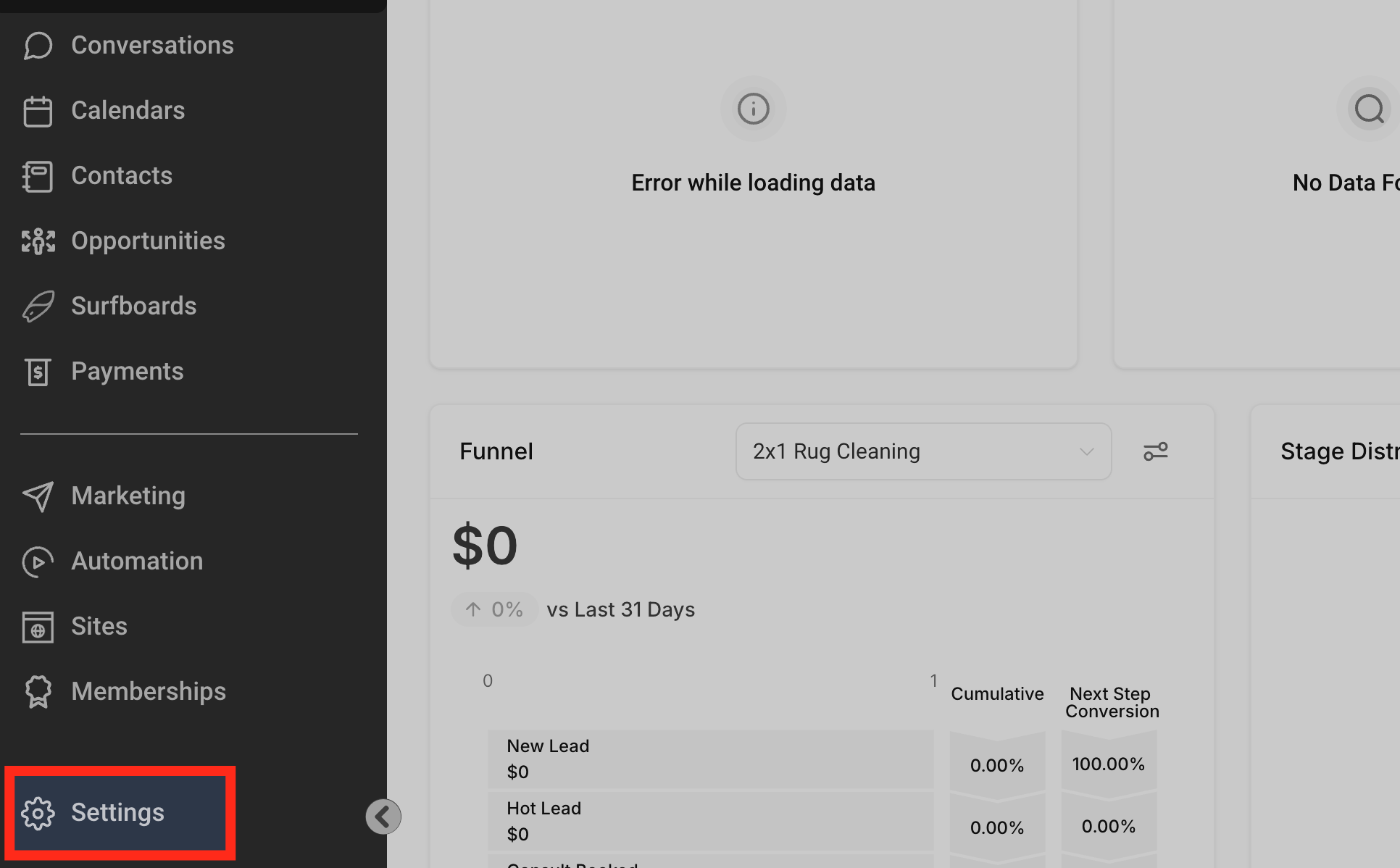
Open Settings → Phone Numbers
**Set Up a Number Pool for Call Tracking (image 1 of 45)**
This screenshot appears in the "Set Up a Number Pool for Call Tracking" section of "How to Set Up Call Tracking (Number Pool)". For context, this section explains: Call Tracking How to Set Up Call Tracking (Number Pool) Show a unique phone number to leads based on where they came from, so every call can be attributed back to its campaign or landing page. What You'll Learn Number pools are a great way to track the calls driven by paid campaigns. Using number…. This part of the guide covers 3 fields, listed below.
- Fields: The swapping number, The visible phone number on the webpage, The href="tel:..." value
- Controls: gclid, Phone Numbers, "Add Number Pool.", "Visitors Activity", Next: Create Pool, All visitors, Number Name, Pool Size, Forwarding Number, Swapping Number, Next: Choose Numbers, Local Number
Full procedure:
1. The swapping number
2. The visible phone number on the webpage
3. The href="tel:..." value
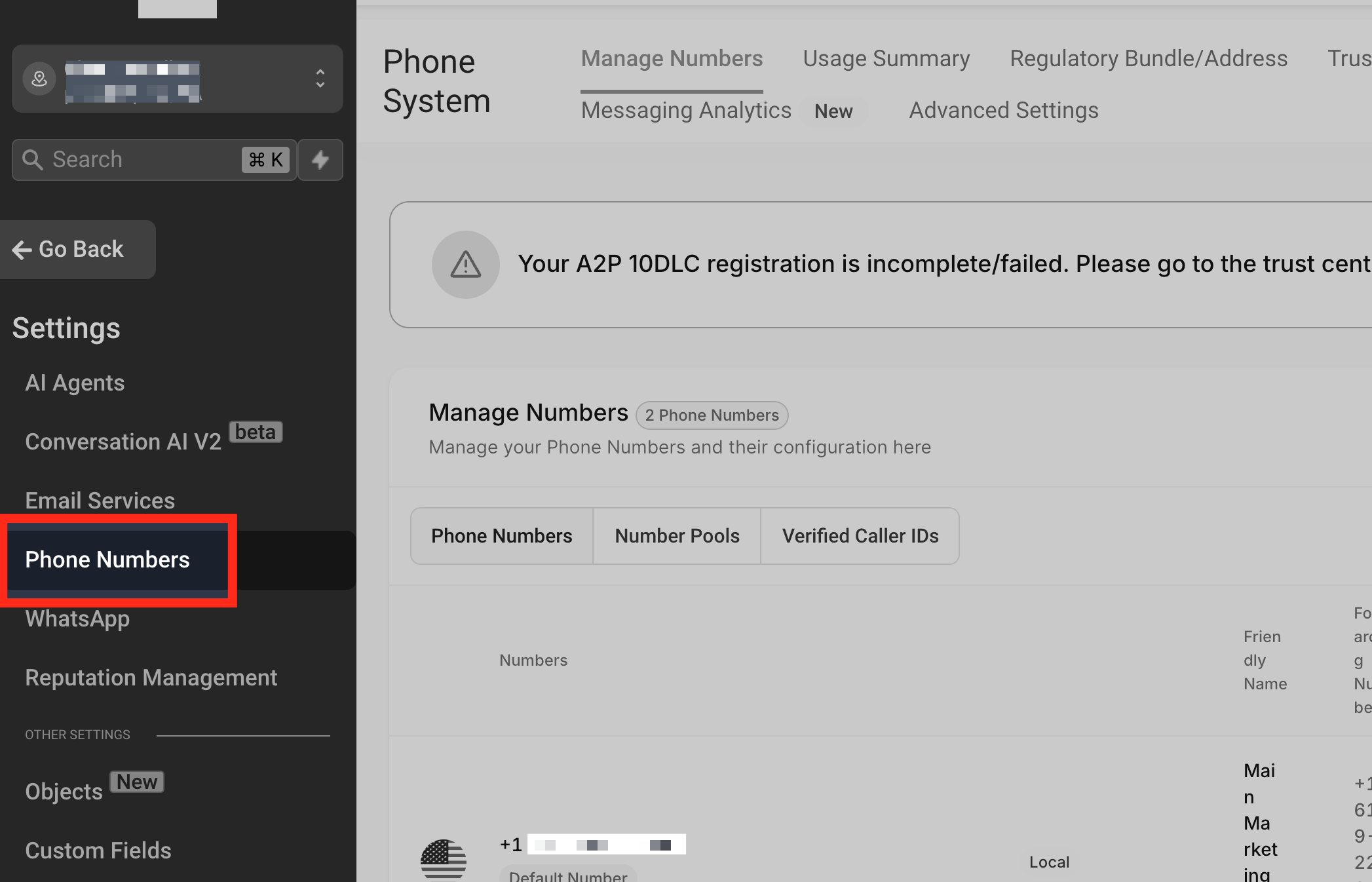
Then click on **Phone Numbers**
**Set Up a Number Pool for Call Tracking (image 2 of 45)**
This screenshot appears in the "Set Up a Number Pool for Call Tracking" section of "How to Set Up Call Tracking (Number Pool)". For context, this section explains: Call Tracking How to Set Up Call Tracking (Number Pool) Show a unique phone number to leads based on where they came from, so every call can be attributed back to its campaign or landing page. What You'll Learn Number pools are a great way to track the calls driven by paid campaigns. Using number…. This part of the guide covers 3 fields, listed below.
- Fields: The swapping number, The visible phone number on the webpage, The href="tel:..." value
- Controls: gclid, Phone Numbers, "Add Number Pool.", "Visitors Activity", Next: Create Pool, All visitors, Number Name, Pool Size, Forwarding Number, Swapping Number, Next: Choose Numbers, Local Number
Full procedure:
1. The swapping number
2. The visible phone number on the webpage
3. The href="tel:..." value
Step 2
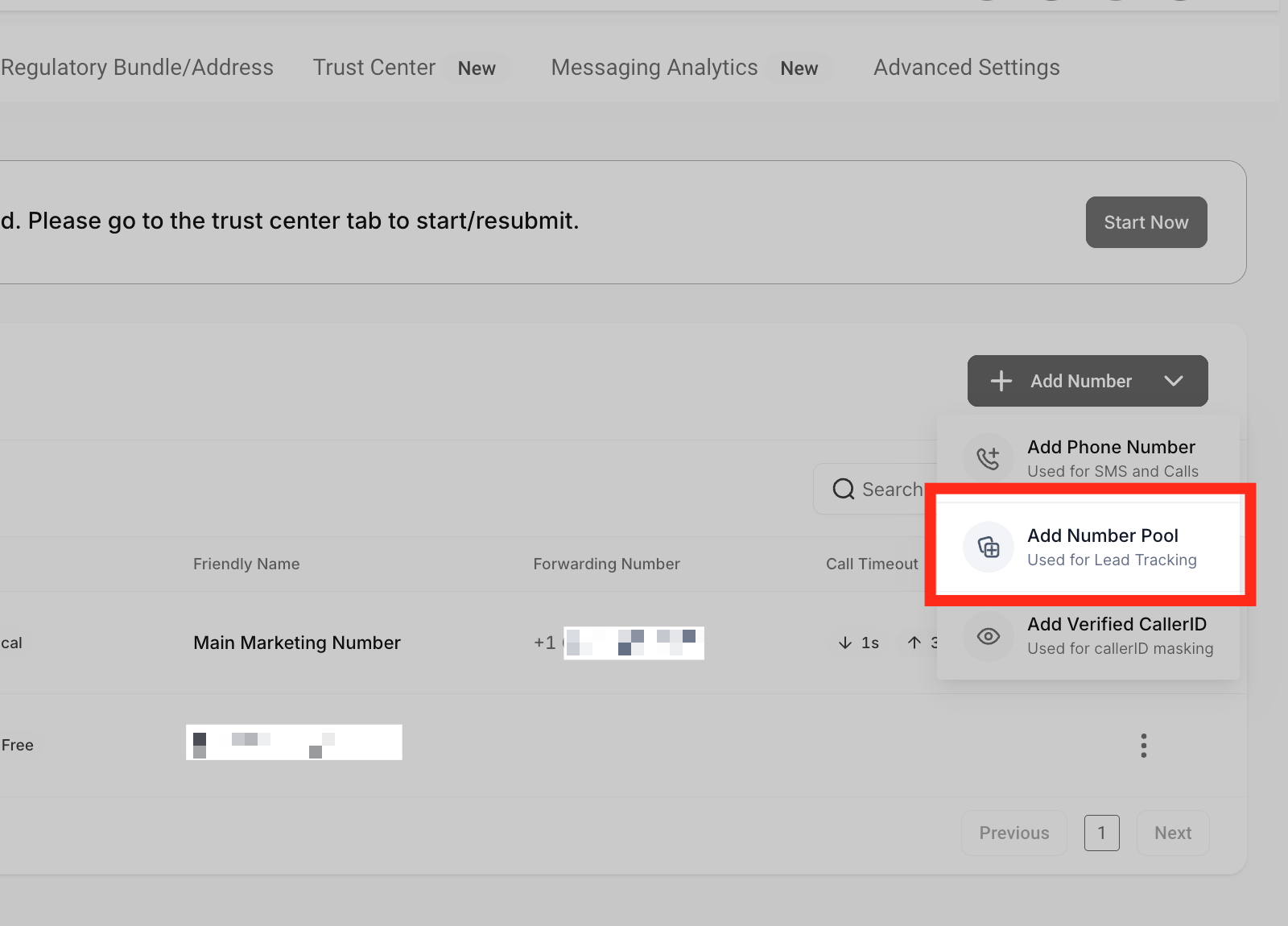
Add a Number Pool
Click **"Add Number Pool."** You can find it under the "+ Add Number" dropdown menu located on the right side of the page.
**Set Up a Number Pool for Call Tracking (image 3 of 45)**
This screenshot appears in the "Set Up a Number Pool for Call Tracking" section of "How to Set Up Call Tracking (Number Pool)". For context, this section explains: Call Tracking How to Set Up Call Tracking (Number Pool) Show a unique phone number to leads based on where they came from, so every call can be attributed back to its campaign or landing page. What You'll Learn Number pools are a great way to track the calls driven by paid campaigns. Using number…. This part of the guide covers 3 fields, listed below.
- Fields: The swapping number, The visible phone number on the webpage, The href="tel:..." value
- Controls: gclid, Phone Numbers, "Add Number Pool.", "Visitors Activity", Next: Create Pool, All visitors, Number Name, Pool Size, Forwarding Number, Swapping Number, Next: Choose Numbers, Local Number
Full procedure:
1. The swapping number
2. The visible phone number on the webpage
3. The href="tel:..." value
Step 3
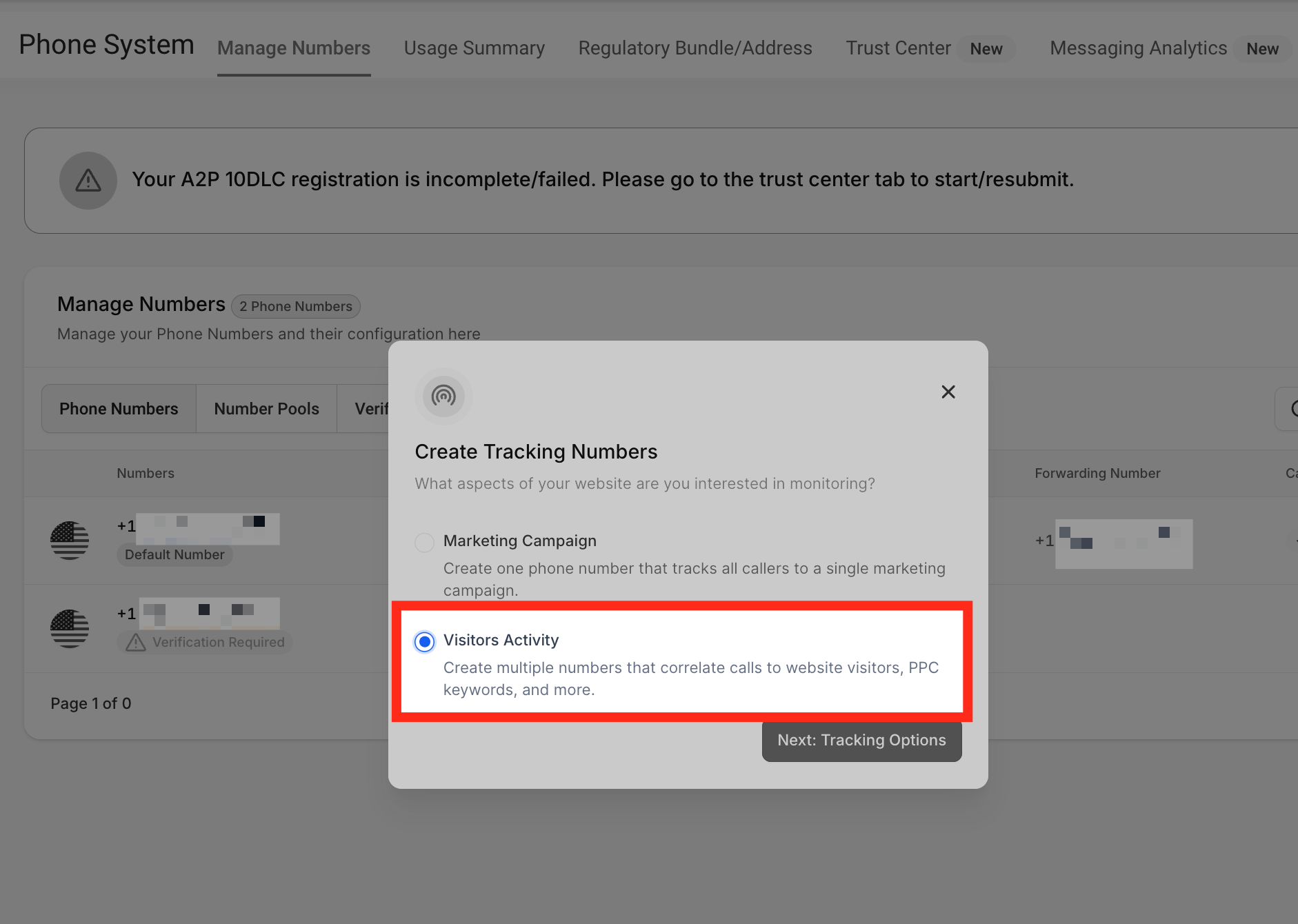
Choose "Visitors Activity"
Since we are creating a number pool for call tracking purposes, we will select the **"Visitors Activity"** option.
**Set Up a Number Pool for Call Tracking (image 4 of 45)**
This screenshot appears in the "Set Up a Number Pool for Call Tracking" section of "How to Set Up Call Tracking (Number Pool)". For context, this section explains: Call Tracking How to Set Up Call Tracking (Number Pool) Show a unique phone number to leads based on where they came from, so every call can be attributed back to its campaign or landing page. What You'll Learn Number pools are a great way to track the calls driven by paid campaigns. Using number…. This part of the guide covers 3 fields, listed below.
- Fields: The swapping number, The visible phone number on the webpage, The href="tel:..." value
- Controls: gclid, Phone Numbers, "Add Number Pool.", "Visitors Activity", Next: Create Pool, All visitors, Number Name, Pool Size, Forwarding Number, Swapping Number, Next: Choose Numbers, Local Number
Full procedure:
1. The swapping number
2. The visible phone number on the webpage
3. The href="tel:..." value
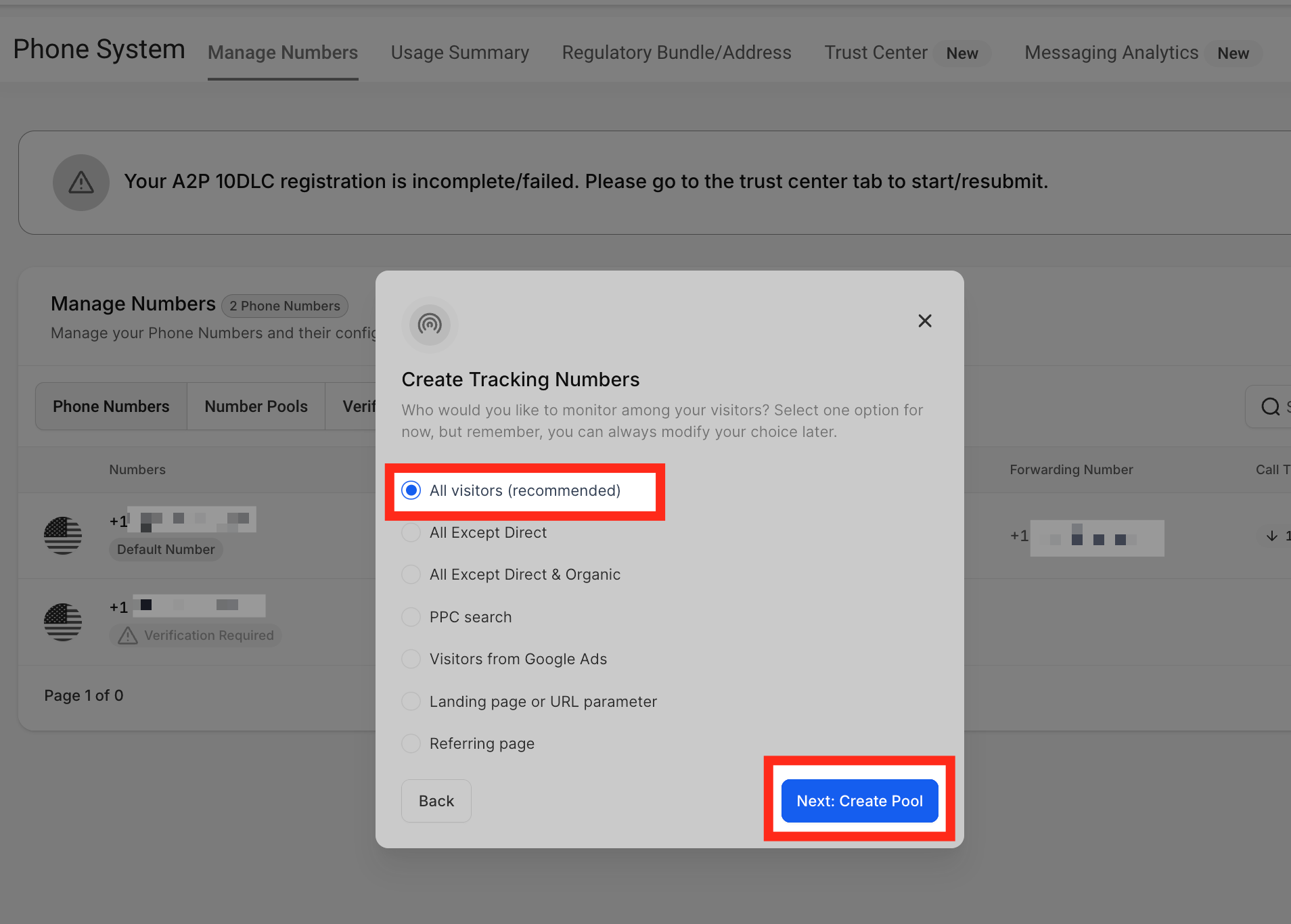
From this list, select which visitors you want to track. Once you pick, click **Next: Create Pool**. We recommend tracking **All visitors**.
_Note: If you select PPC search, the number on the website will only switch when the visitors are landing from a paid ad._
**Set Up a Number Pool for Call Tracking (image 5 of 45)**
This screenshot appears in the "Set Up a Number Pool for Call Tracking" section of "How to Set Up Call Tracking (Number Pool)". For context, this section explains: Call Tracking How to Set Up Call Tracking (Number Pool) Show a unique phone number to leads based on where they came from, so every call can be attributed back to its campaign or landing page. What You'll Learn Number pools are a great way to track the calls driven by paid campaigns. Using number…. This part of the guide covers 3 fields, listed below.
- Fields: The swapping number, The visible phone number on the webpage, The href="tel:..." value
- Controls: gclid, Phone Numbers, "Add Number Pool.", "Visitors Activity", Next: Create Pool, All visitors, Number Name, Pool Size, Forwarding Number, Swapping Number, Next: Choose Numbers, Local Number
Full procedure:
1. The swapping number
2. The visible phone number on the webpage
3. The href="tel:..." value
Step 4
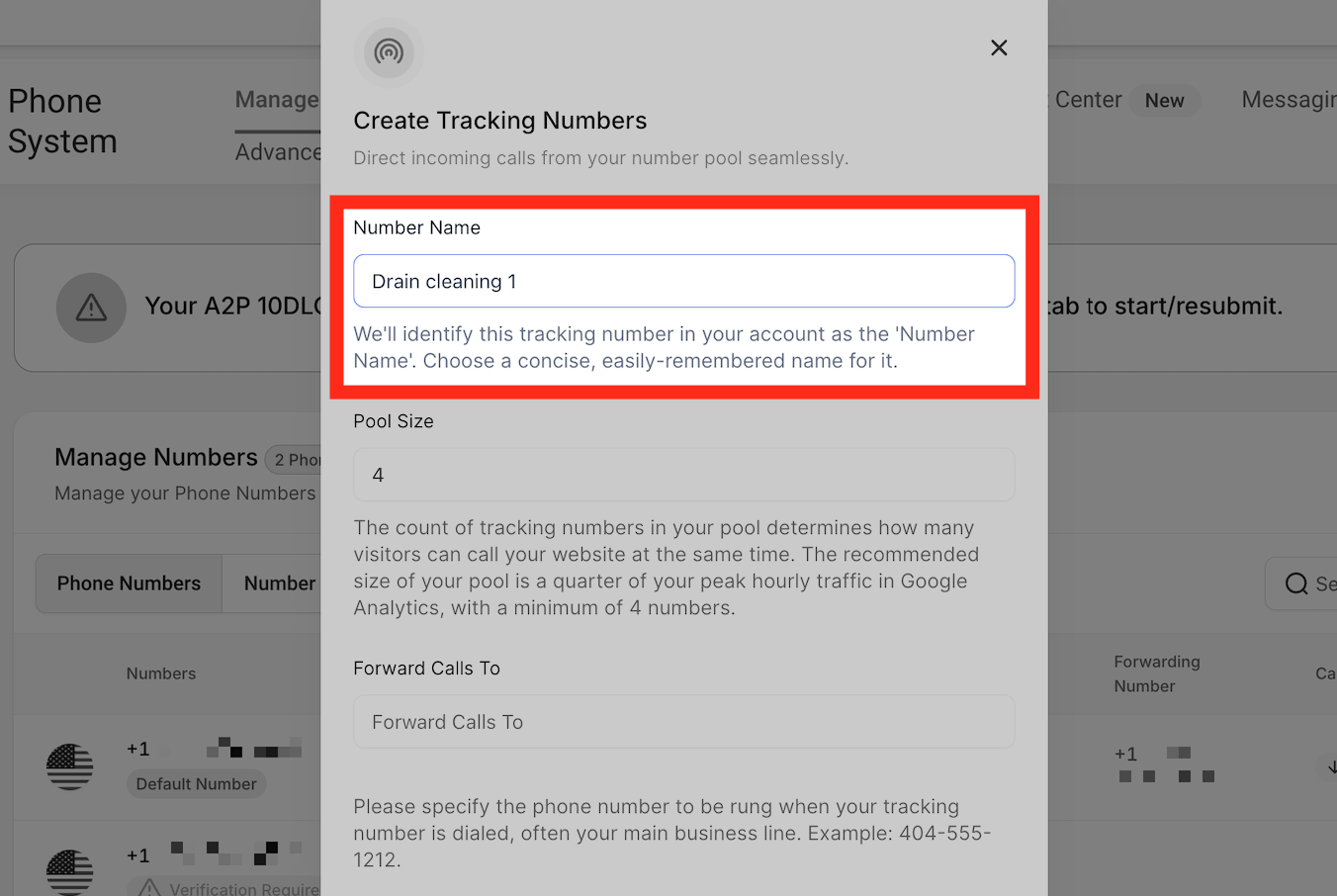
Name the Pool & Set the Pool Size
**Number Name** — In this field, you can name your tracking number.
**Set Up a Number Pool for Call Tracking (image 6 of 45)**
This screenshot appears in the "Set Up a Number Pool for Call Tracking" section of "How to Set Up Call Tracking (Number Pool)". For context, this section explains: Call Tracking How to Set Up Call Tracking (Number Pool) Show a unique phone number to leads based on where they came from, so every call can be attributed back to its campaign or landing page. What You'll Learn Number pools are a great way to track the calls driven by paid campaigns. Using number…. This part of the guide covers 3 fields, listed below.
- Fields: The swapping number, The visible phone number on the webpage, The href="tel:..." value
- Controls: gclid, Phone Numbers, "Add Number Pool.", "Visitors Activity", Next: Create Pool, All visitors, Number Name, Pool Size, Forwarding Number, Swapping Number, Next: Choose Numbers, Local Number
Full procedure:
1. The swapping number
2. The visible phone number on the webpage
3. The href="tel:..." value
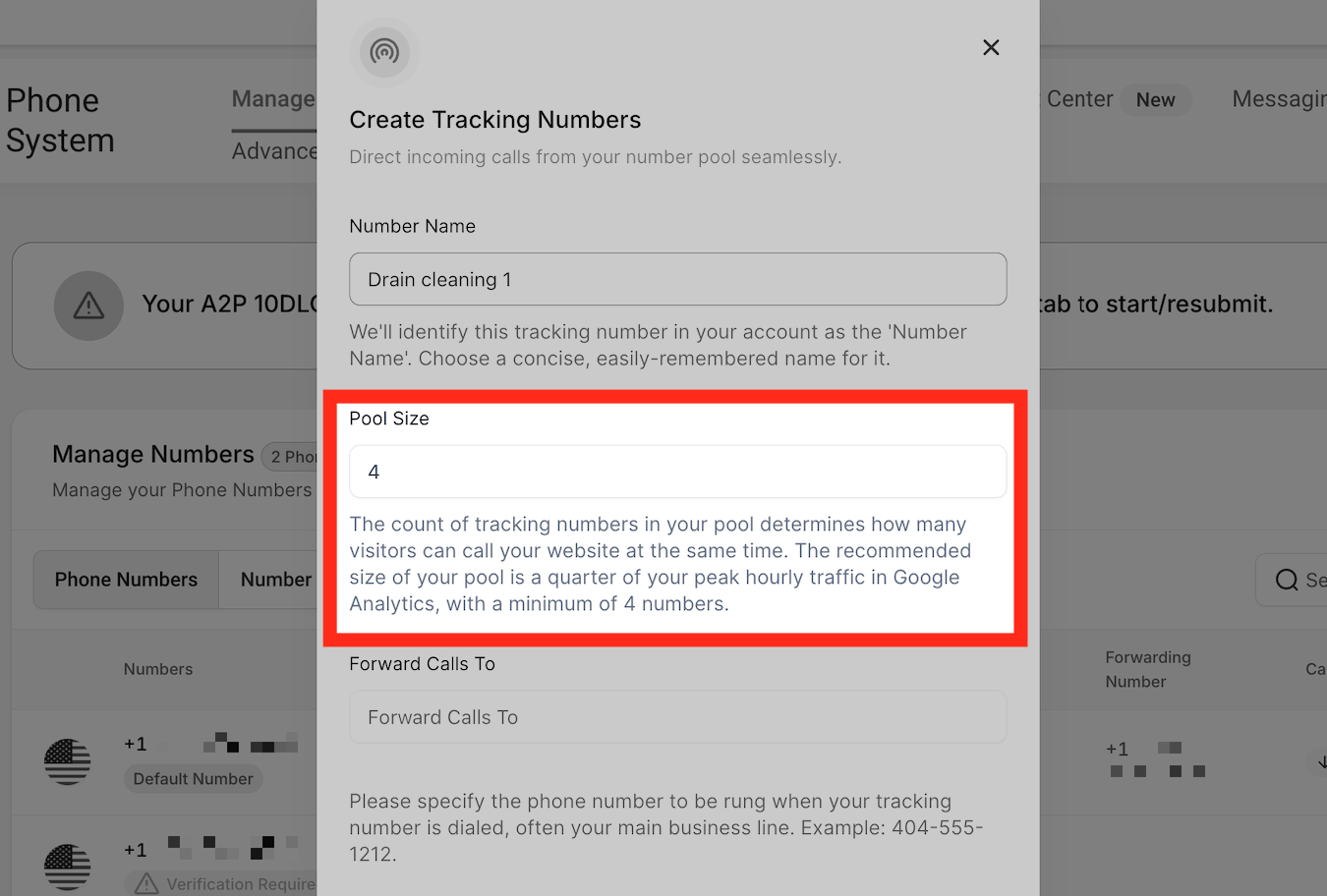
**Pool Size** — Each number pool has a minimum of 4 tracking numbers in it. You can decide the size of the pool depending on the volume of your calls. The more volume, the more tracking numbers will be needed.
**Set Up a Number Pool for Call Tracking (image 7 of 45)**
This screenshot appears in the "Set Up a Number Pool for Call Tracking" section of "How to Set Up Call Tracking (Number Pool)". For context, this section explains: Call Tracking How to Set Up Call Tracking (Number Pool) Show a unique phone number to leads based on where they came from, so every call can be attributed back to its campaign or landing page. What You'll Learn Number pools are a great way to track the calls driven by paid campaigns. Using number…. This part of the guide covers 3 fields, listed below.
- Fields: The swapping number, The visible phone number on the webpage, The href="tel:..." value
- Controls: gclid, Phone Numbers, "Add Number Pool.", "Visitors Activity", Next: Create Pool, All visitors, Number Name, Pool Size, Forwarding Number, Swapping Number, Next: Choose Numbers, Local Number
Full procedure:
1. The swapping number
2. The visible phone number on the webpage
3. The href="tel:..." value
Step 5
Set the Forwarding & Swapping Numbers
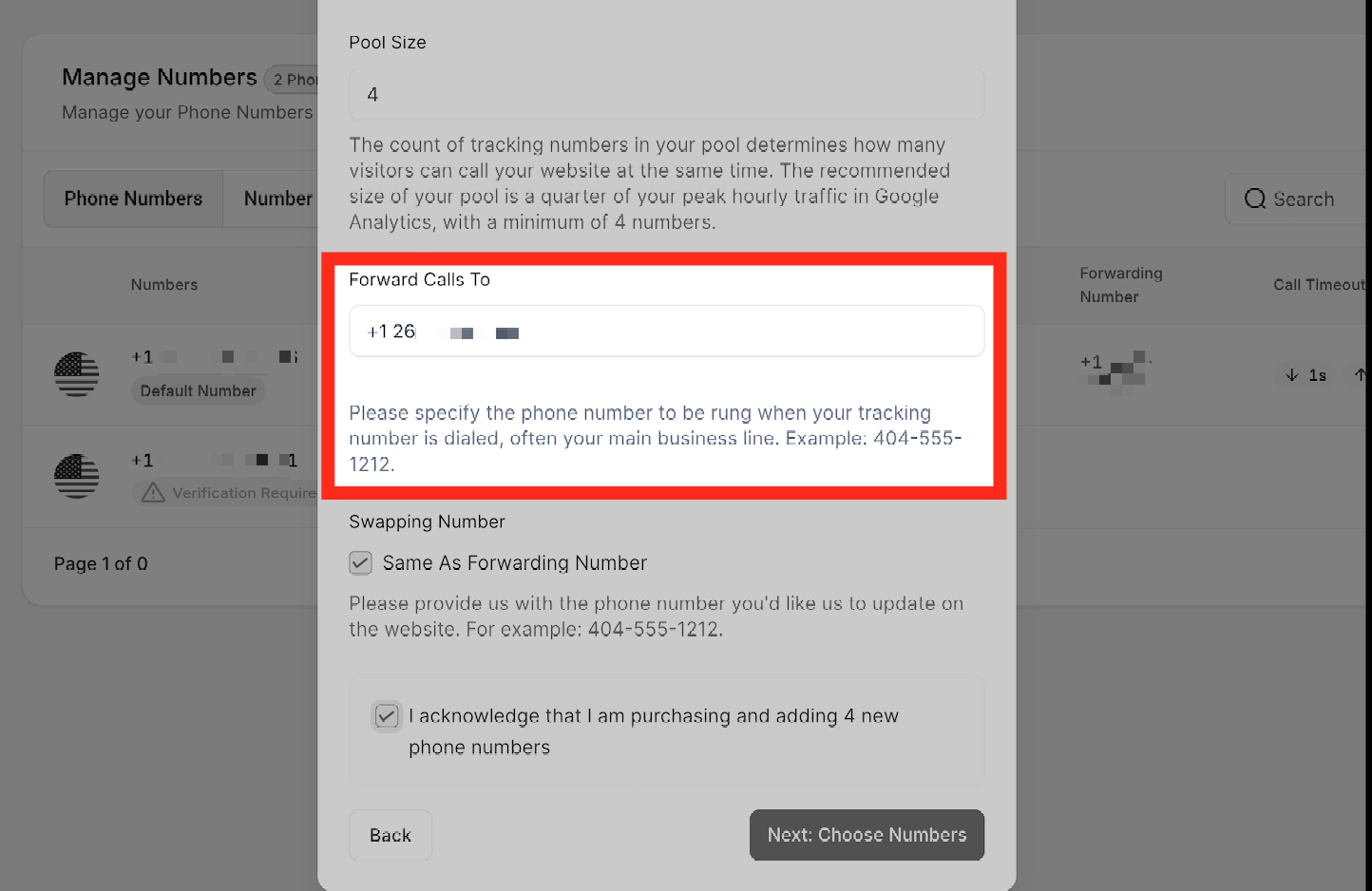
**Forwarding Number** — Enter the main business number, or the number where you would like to receive calls whenever callers dial the tracking number.
Note:
You cannot use a Twilio/LC phone number as your forwarding number, as this will create a looping issue. Be sure to use a different external number to avoid call routing problems.
**Set Up a Number Pool for Call Tracking (image 8 of 45)**
This screenshot appears in the "Set Up a Number Pool for Call Tracking" section of "How to Set Up Call Tracking (Number Pool)". For context, this section explains: Call Tracking How to Set Up Call Tracking (Number Pool) Show a unique phone number to leads based on where they came from, so every call can be attributed back to its campaign or landing page. What You'll Learn Number pools are a great way to track the calls driven by paid campaigns. Using number…. This part of the guide covers 3 fields, listed below.
- Fields: The swapping number, The visible phone number on the webpage, The href="tel:..." value
- Controls: gclid, Phone Numbers, "Add Number Pool.", "Visitors Activity", Next: Create Pool, All visitors, Number Name, Pool Size, Forwarding Number, Swapping Number, Next: Choose Numbers, Local Number
Full procedure:
1. The swapping number
2. The visible phone number on the webpage
3. The href="tel:..." value
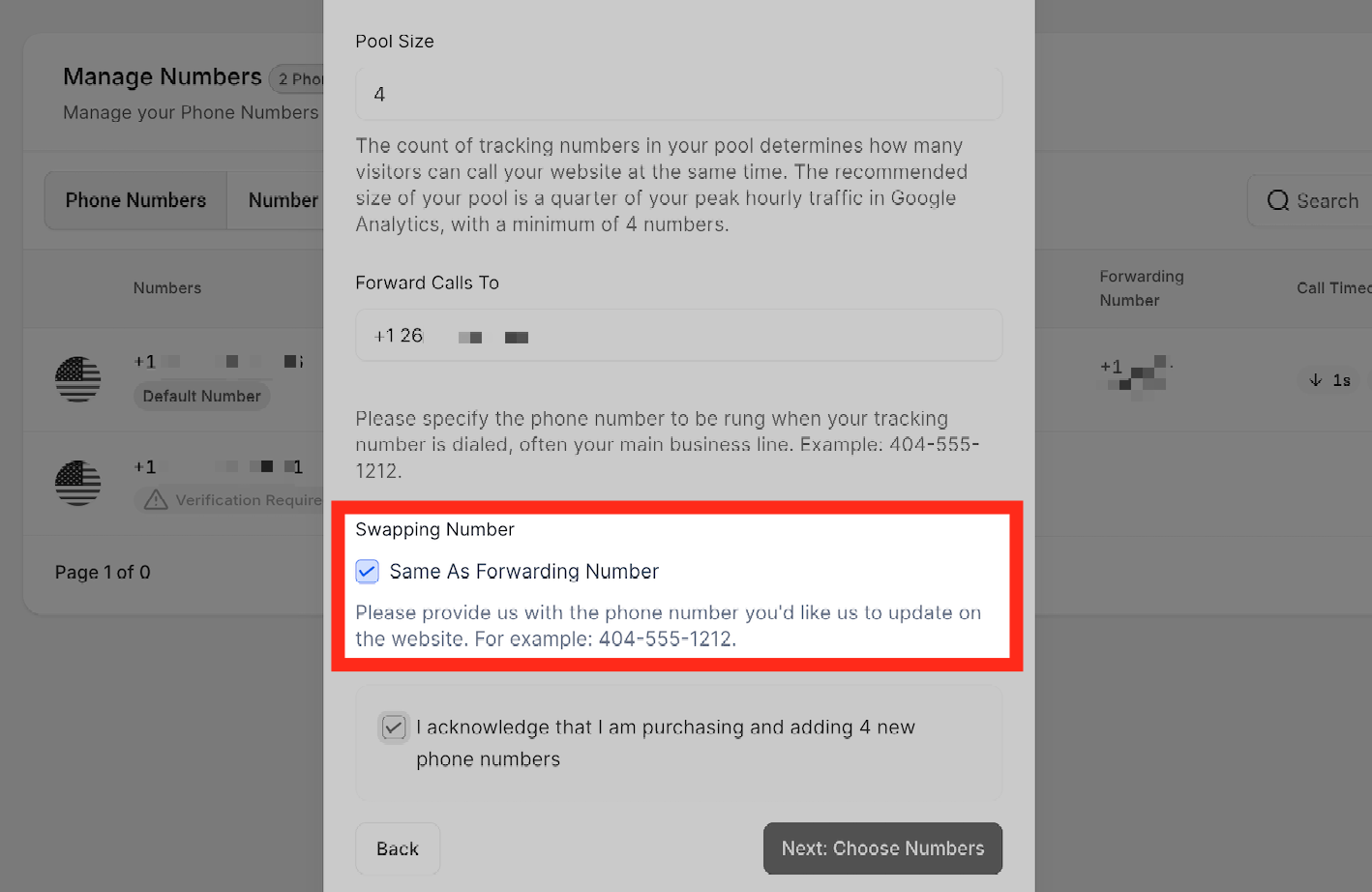
**Swapping Number** — Input the phone number you would like the system to update on your website. It can either be the same number as the forwarding number you set in the previous step, or you can uncheck the box to provide a different number.
**Set Up a Number Pool for Call Tracking (image 9 of 45)**
This screenshot appears in the "Set Up a Number Pool for Call Tracking" section of "How to Set Up Call Tracking (Number Pool)". For context, this section explains: Call Tracking How to Set Up Call Tracking (Number Pool) Show a unique phone number to leads based on where they came from, so every call can be attributed back to its campaign or landing page. What You'll Learn Number pools are a great way to track the calls driven by paid campaigns. Using number…. This part of the guide covers 3 fields, listed below.
- Fields: The swapping number, The visible phone number on the webpage, The href="tel:..." value
- Controls: gclid, Phone Numbers, "Add Number Pool.", "Visitors Activity", Next: Create Pool, All visitors, Number Name, Pool Size, Forwarding Number, Swapping Number, Next: Choose Numbers, Local Number
Full procedure:
1. The swapping number
2. The visible phone number on the webpage
3. The href="tel:..." value
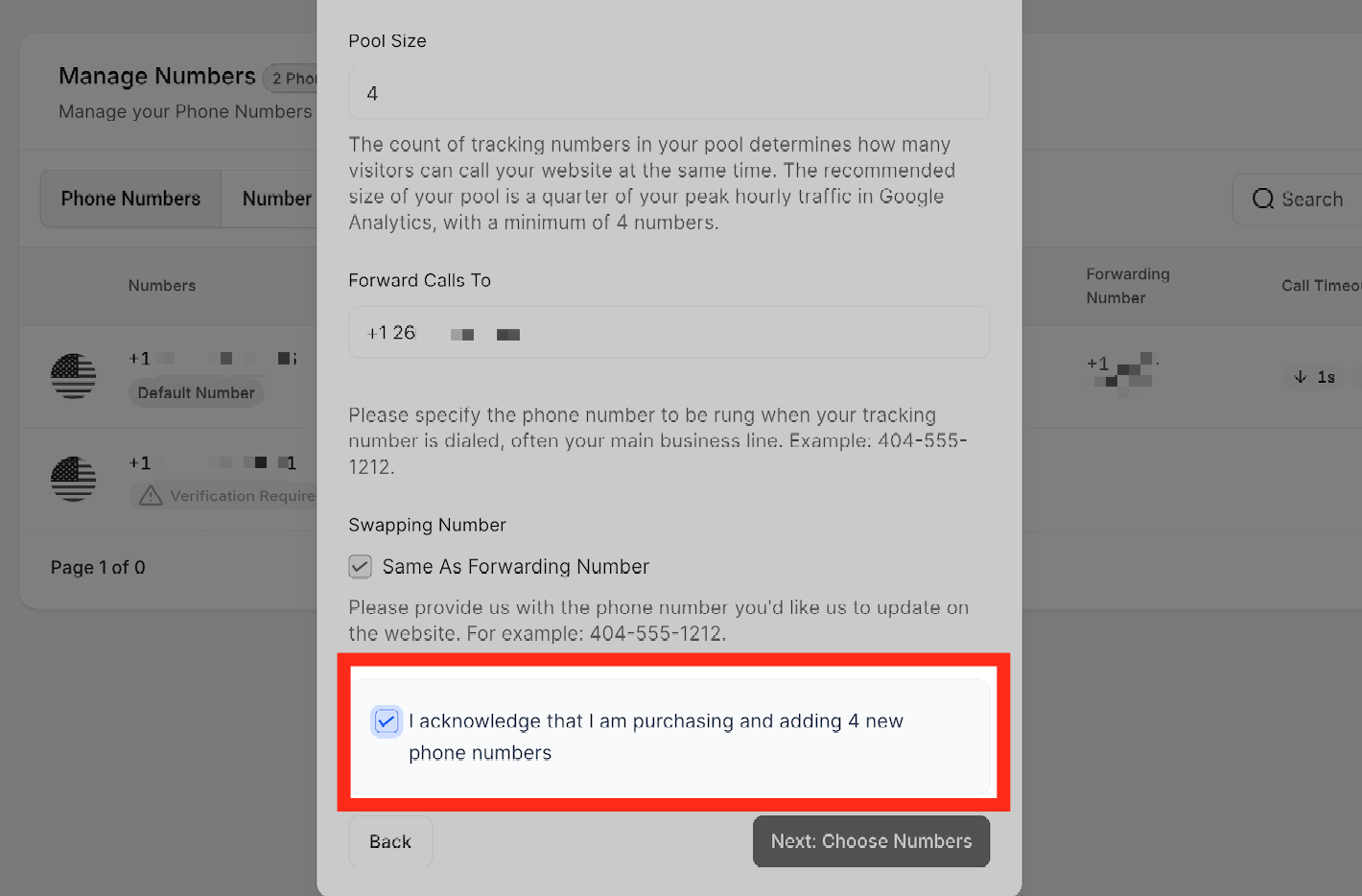
By checking this box, you acknowledge that you are purchasing 4 new phone numbers to add to your number pool.
**Set Up a Number Pool for Call Tracking (image 10 of 45)**
This screenshot appears in the "Set Up a Number Pool for Call Tracking" section of "How to Set Up Call Tracking (Number Pool)". For context, this section explains: Call Tracking How to Set Up Call Tracking (Number Pool) Show a unique phone number to leads based on where they came from, so every call can be attributed back to its campaign or landing page. What You'll Learn Number pools are a great way to track the calls driven by paid campaigns. Using number…. This part of the guide covers 3 fields, listed below.
- Fields: The swapping number, The visible phone number on the webpage, The href="tel:..." value
- Controls: gclid, Phone Numbers, "Add Number Pool.", "Visitors Activity", Next: Create Pool, All visitors, Number Name, Pool Size, Forwarding Number, Swapping Number, Next: Choose Numbers, Local Number
Full procedure:
1. The swapping number
2. The visible phone number on the webpage
3. The href="tel:..." value
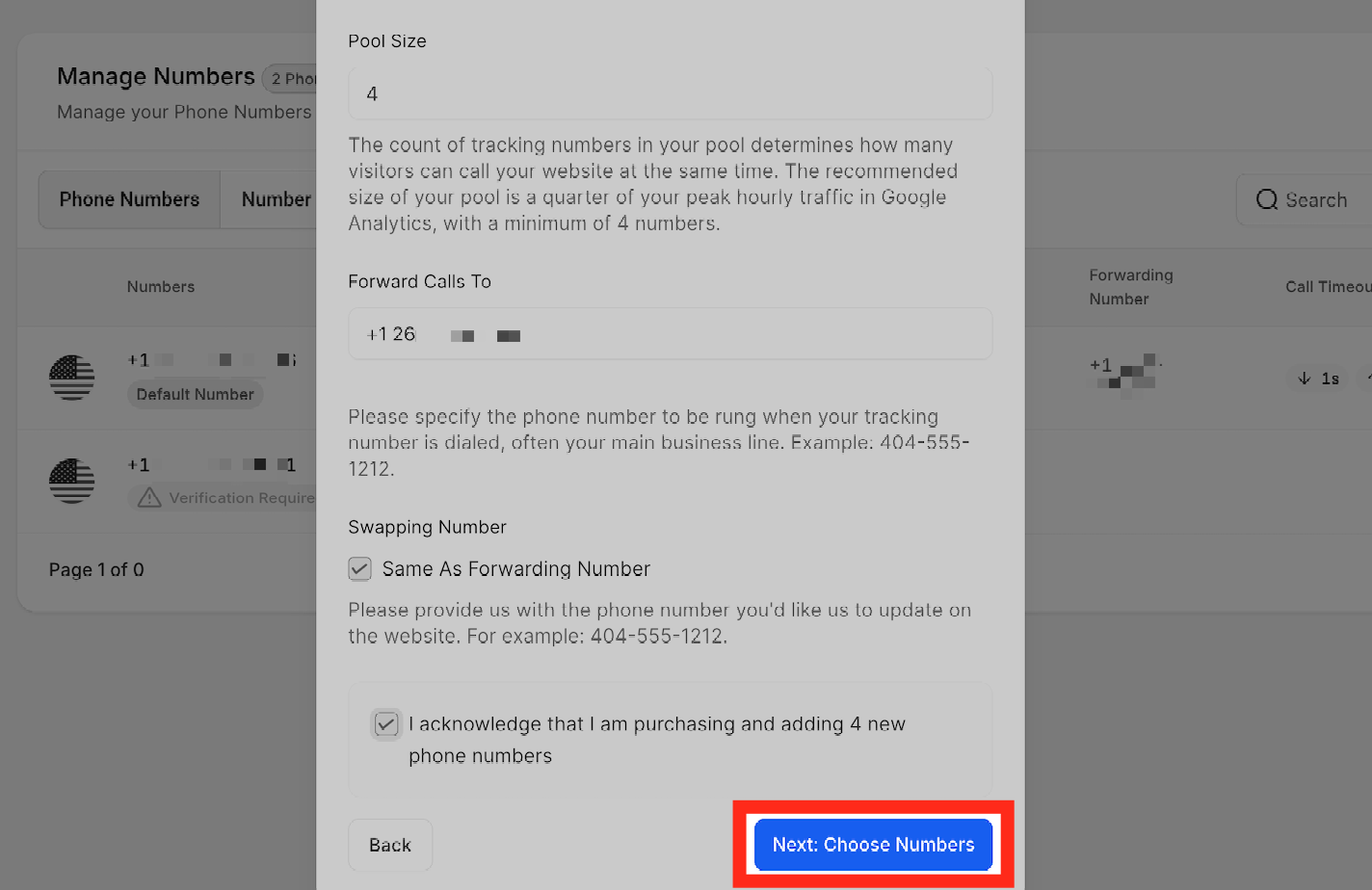
Once you fill out all the information, click **Next: Choose Numbers**.
**Set Up a Number Pool for Call Tracking (image 11 of 45)**
This screenshot appears in the "Set Up a Number Pool for Call Tracking" section of "How to Set Up Call Tracking (Number Pool)". For context, this section explains: Call Tracking How to Set Up Call Tracking (Number Pool) Show a unique phone number to leads based on where they came from, so every call can be attributed back to its campaign or landing page. What You'll Learn Number pools are a great way to track the calls driven by paid campaigns. Using number…. This part of the guide covers 3 fields, listed below.
- Fields: The swapping number, The visible phone number on the webpage, The href="tel:..." value
- Controls: gclid, Phone Numbers, "Add Number Pool.", "Visitors Activity", Next: Create Pool, All visitors, Number Name, Pool Size, Forwarding Number, Swapping Number, Next: Choose Numbers, Local Number
Full procedure:
1. The swapping number
2. The visible phone number on the webpage
3. The href="tel:..." value
Step 6
Choose Your Tracking Numbers
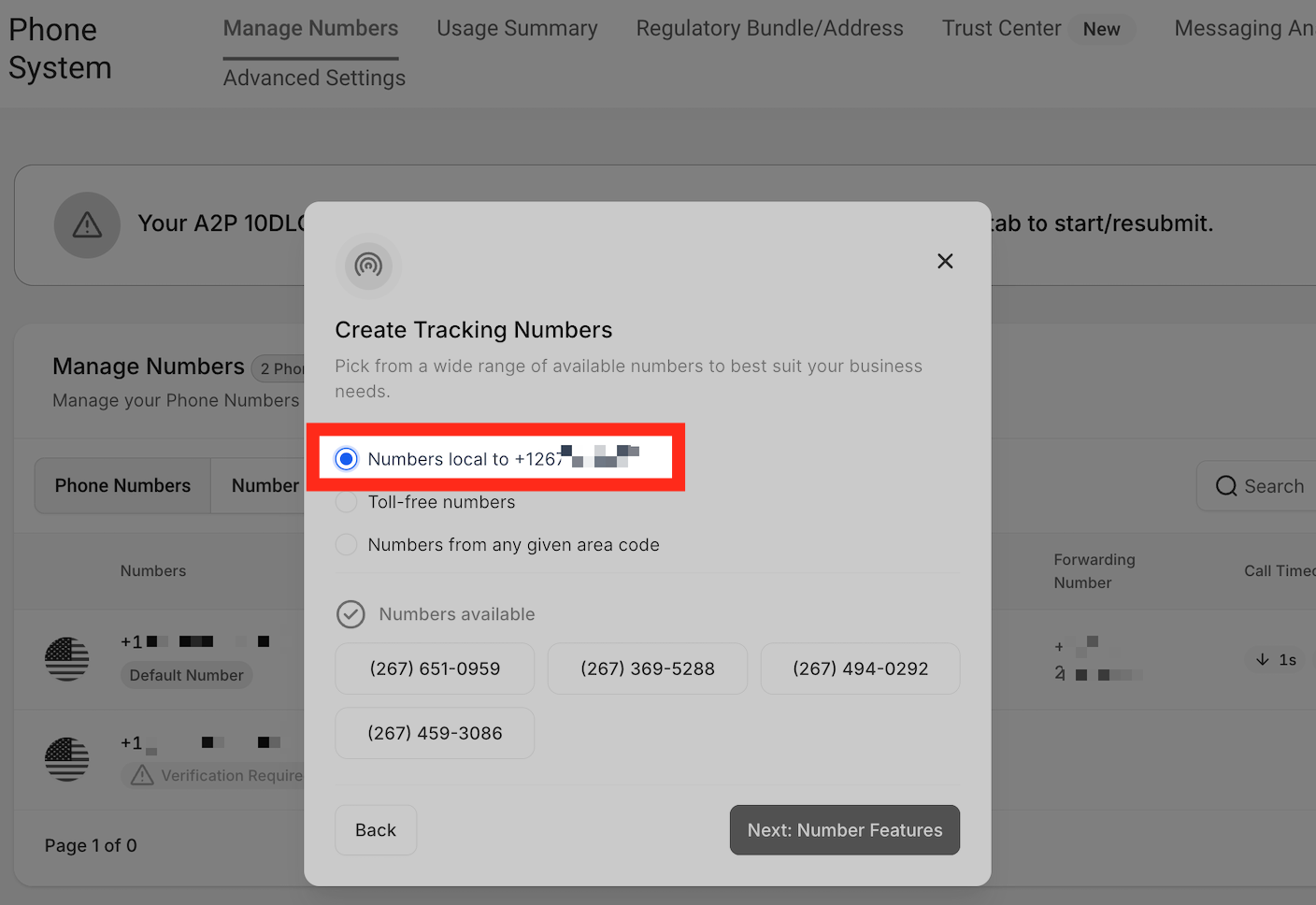
When creating tracking numbers, you have the option to choose phone number(s) local to the area code, a toll-free number, or numbers from any given area code.
**Local Number** — When you select local number, you will be shown 4 different phone numbers local to the phone number you have set as a "Forwarding Number" earlier in this process.
**Set Up a Number Pool for Call Tracking (image 12 of 45)**
This screenshot appears in the "Set Up a Number Pool for Call Tracking" section of "How to Set Up Call Tracking (Number Pool)". For context, this section explains: Call Tracking How to Set Up Call Tracking (Number Pool) Show a unique phone number to leads based on where they came from, so every call can be attributed back to its campaign or landing page. What You'll Learn Number pools are a great way to track the calls driven by paid campaigns. Using number…. This part of the guide covers 3 fields, listed below.
- Fields: The swapping number, The visible phone number on the webpage, The href="tel:..." value
- Controls: gclid, Phone Numbers, "Add Number Pool.", "Visitors Activity", Next: Create Pool, All visitors, Number Name, Pool Size, Forwarding Number, Swapping Number, Next: Choose Numbers, Local Number
Full procedure:
1. The swapping number
2. The visible phone number on the webpage
3. The href="tel:..." value
**Toll-free numbers** — This option gives you the ability to choose toll-free numbers for your number pool. Use this option when there are no numbers available in your desired area code.
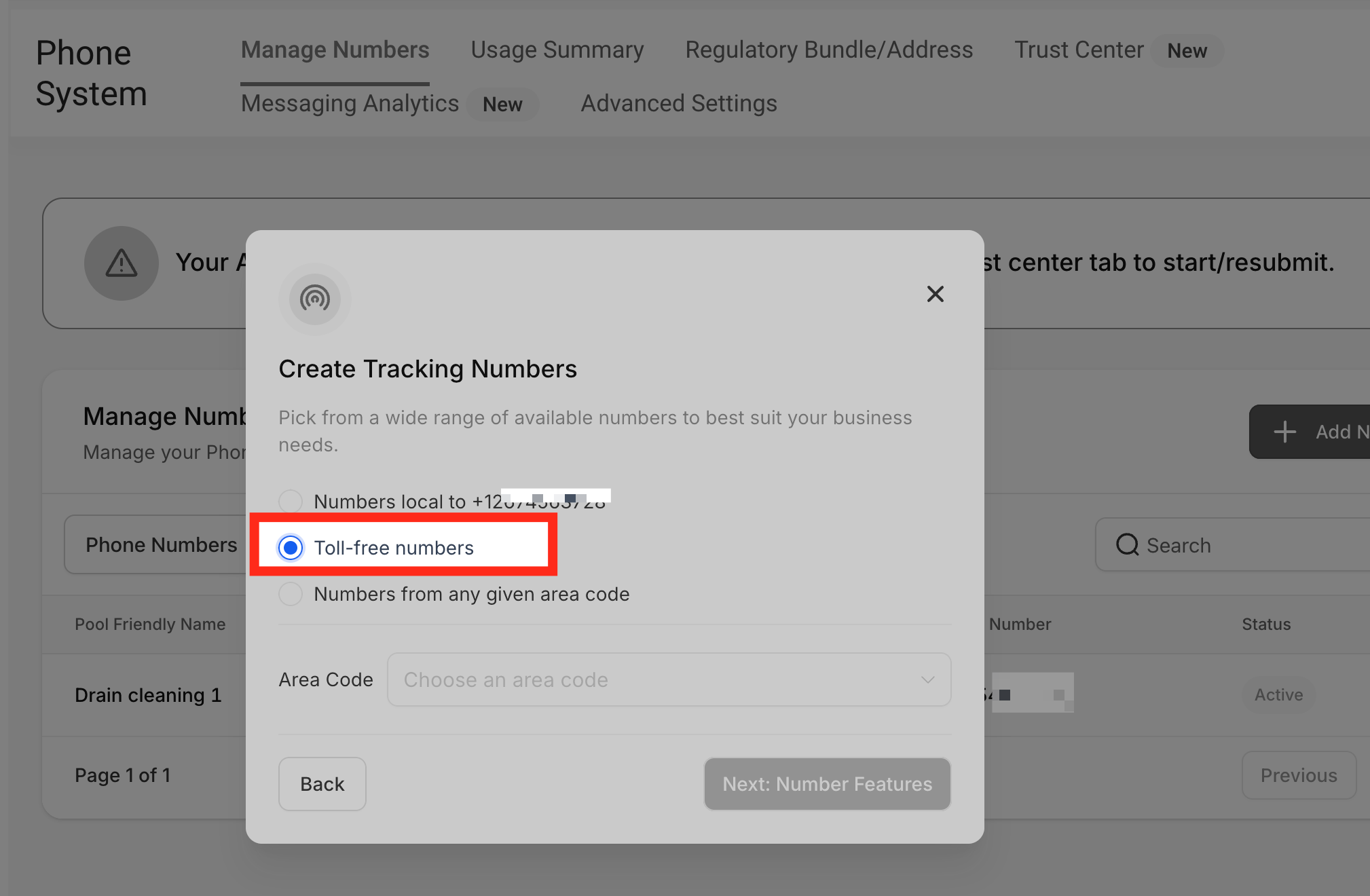
**Set Up a Number Pool for Call Tracking (image 13 of 45)**
This screenshot appears in the "Set Up a Number Pool for Call Tracking" section of "How to Set Up Call Tracking (Number Pool)". For context, this section explains: Call Tracking How to Set Up Call Tracking (Number Pool) Show a unique phone number to leads based on where they came from, so every call can be attributed back to its campaign or landing page. What You'll Learn Number pools are a great way to track the calls driven by paid campaigns. Using number…. This part of the guide covers 3 fields, listed below.
- Fields: The swapping number, The visible phone number on the webpage, The href="tel:..." value
- Controls: gclid, Phone Numbers, "Add Number Pool.", "Visitors Activity", Next: Create Pool, All visitors, Number Name, Pool Size, Forwarding Number, Swapping Number, Next: Choose Numbers, Local Number
Full procedure:
1. The swapping number
2. The visible phone number on the webpage
3. The href="tel:..." value
To see the available toll-free numbers, choose the area code from the dropdown menu.
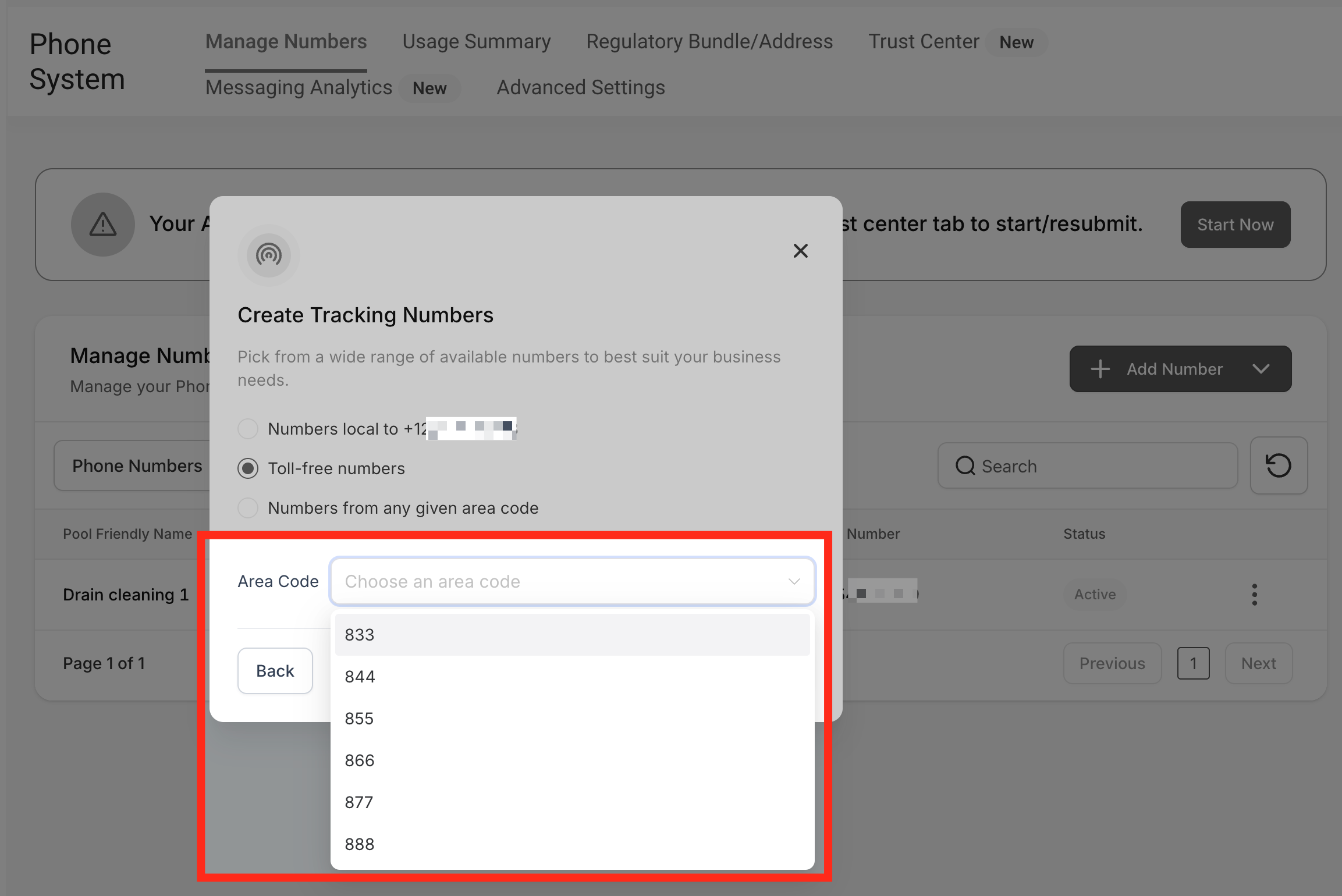
**Set Up a Number Pool for Call Tracking (image 14 of 45)**
This screenshot appears in the "Set Up a Number Pool for Call Tracking" section of "How to Set Up Call Tracking (Number Pool)". For context, this section explains: Call Tracking How to Set Up Call Tracking (Number Pool) Show a unique phone number to leads based on where they came from, so every call can be attributed back to its campaign or landing page. What You'll Learn Number pools are a great way to track the calls driven by paid campaigns. Using number…. This part of the guide covers 3 fields, listed below.
- Fields: The swapping number, The visible phone number on the webpage, The href="tel:..." value
- Controls: gclid, Phone Numbers, "Add Number Pool.", "Visitors Activity", Next: Create Pool, All visitors, Number Name, Pool Size, Forwarding Number, Swapping Number, Next: Choose Numbers, Local Number
Full procedure:
1. The swapping number
2. The visible phone number on the webpage
3. The href="tel:..." value
**Numbers from any given area code** — If you are open to choosing a phone number from a different region, just type the area code and click "Check Availability," and you will see the available phone numbers in a few seconds.
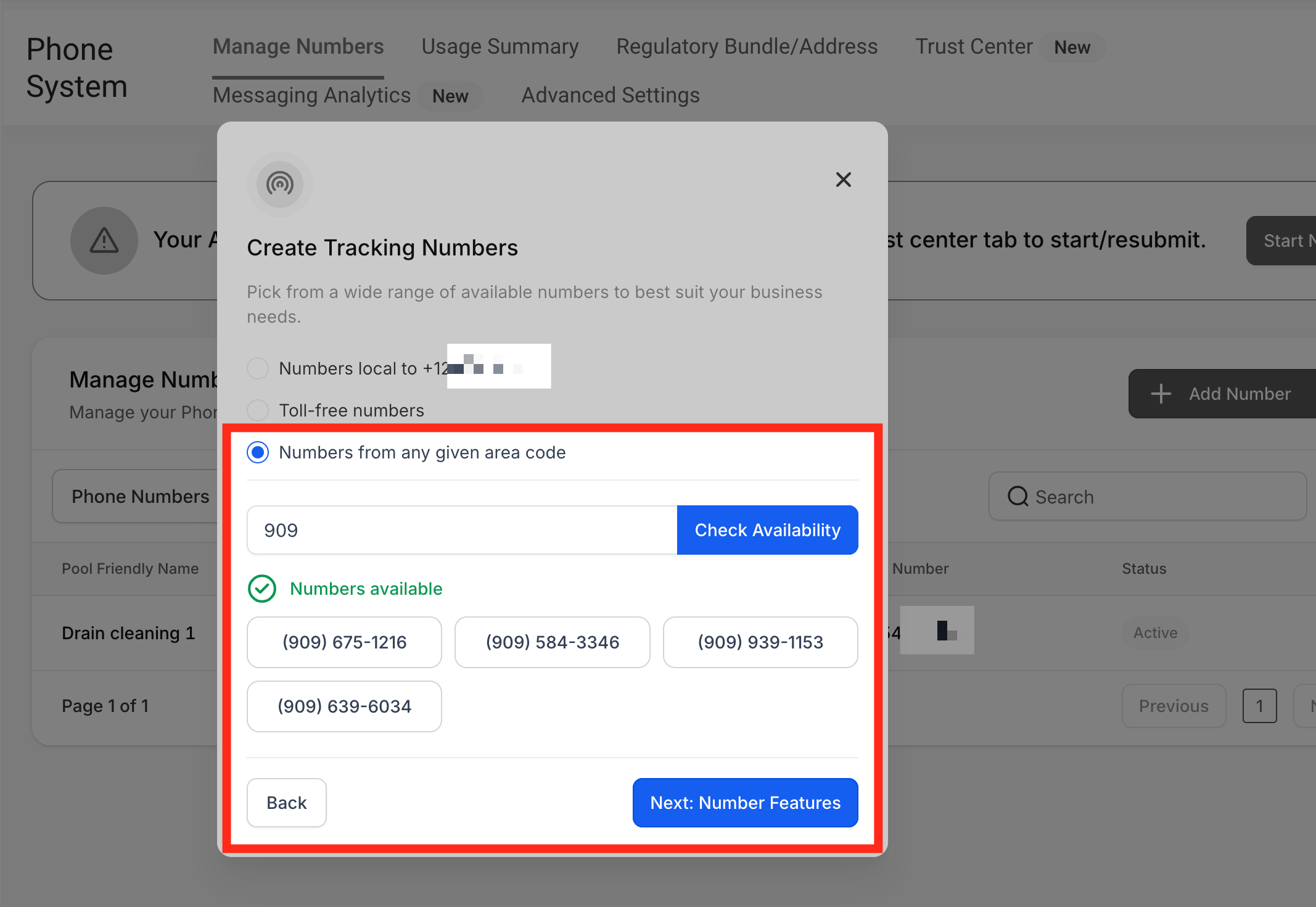
**Set Up a Number Pool for Call Tracking (image 15 of 45)**
This screenshot appears in the "Set Up a Number Pool for Call Tracking" section of "How to Set Up Call Tracking (Number Pool)". For context, this section explains: Call Tracking How to Set Up Call Tracking (Number Pool) Show a unique phone number to leads based on where they came from, so every call can be attributed back to its campaign or landing page. What You'll Learn Number pools are a great way to track the calls driven by paid campaigns. Using number…. This part of the guide covers 3 fields, listed below.
- Fields: The swapping number, The visible phone number on the webpage, The href="tel:..." value
- Controls: gclid, Phone Numbers, "Add Number Pool.", "Visitors Activity", Next: Create Pool, All visitors, Number Name, Pool Size, Forwarding Number, Swapping Number, Next: Choose Numbers, Local Number
Full procedure:
1. The swapping number
2. The visible phone number on the webpage
3. The href="tel:..." value
Once you've created a tracking number using any of the 3 methods above, let's move to the next steps — click **"Next: Number Features."**
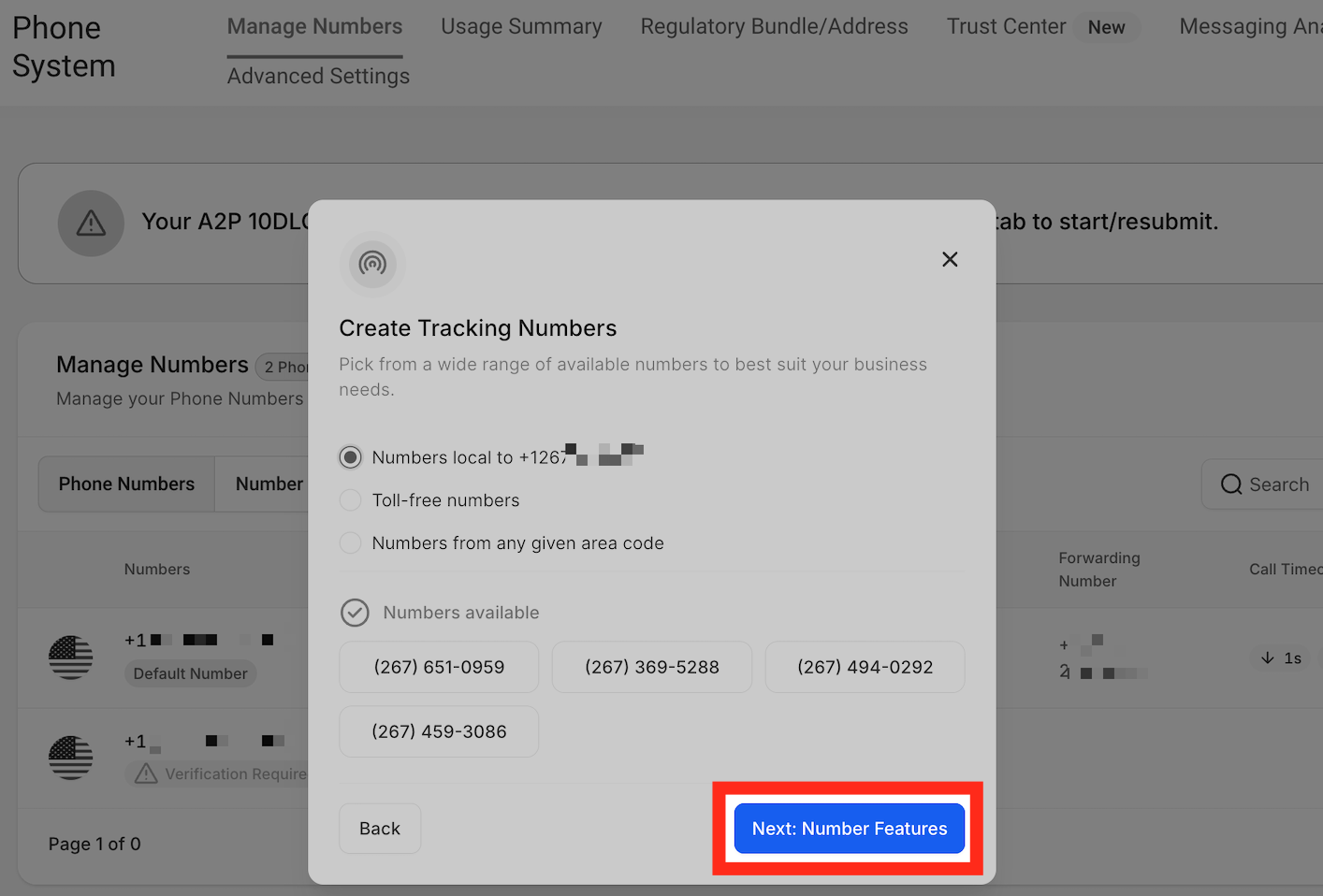
**Set Up a Number Pool for Call Tracking (image 16 of 45)**
This screenshot appears in the "Set Up a Number Pool for Call Tracking" section of "How to Set Up Call Tracking (Number Pool)". For context, this section explains: Call Tracking How to Set Up Call Tracking (Number Pool) Show a unique phone number to leads based on where they came from, so every call can be attributed back to its campaign or landing page. What You'll Learn Number pools are a great way to track the calls driven by paid campaigns. Using number…. This part of the guide covers 3 fields, listed below.
- Fields: The swapping number, The visible phone number on the webpage, The href="tel:..." value
- Controls: gclid, Phone Numbers, "Add Number Pool.", "Visitors Activity", Next: Create Pool, All visitors, Number Name, Pool Size, Forwarding Number, Swapping Number, Next: Choose Numbers, Local Number
Full procedure:
1. The swapping number
2. The visible phone number on the webpage
3. The href="tel:..." value
Step 7
Configure Whisper Message & Call Recording
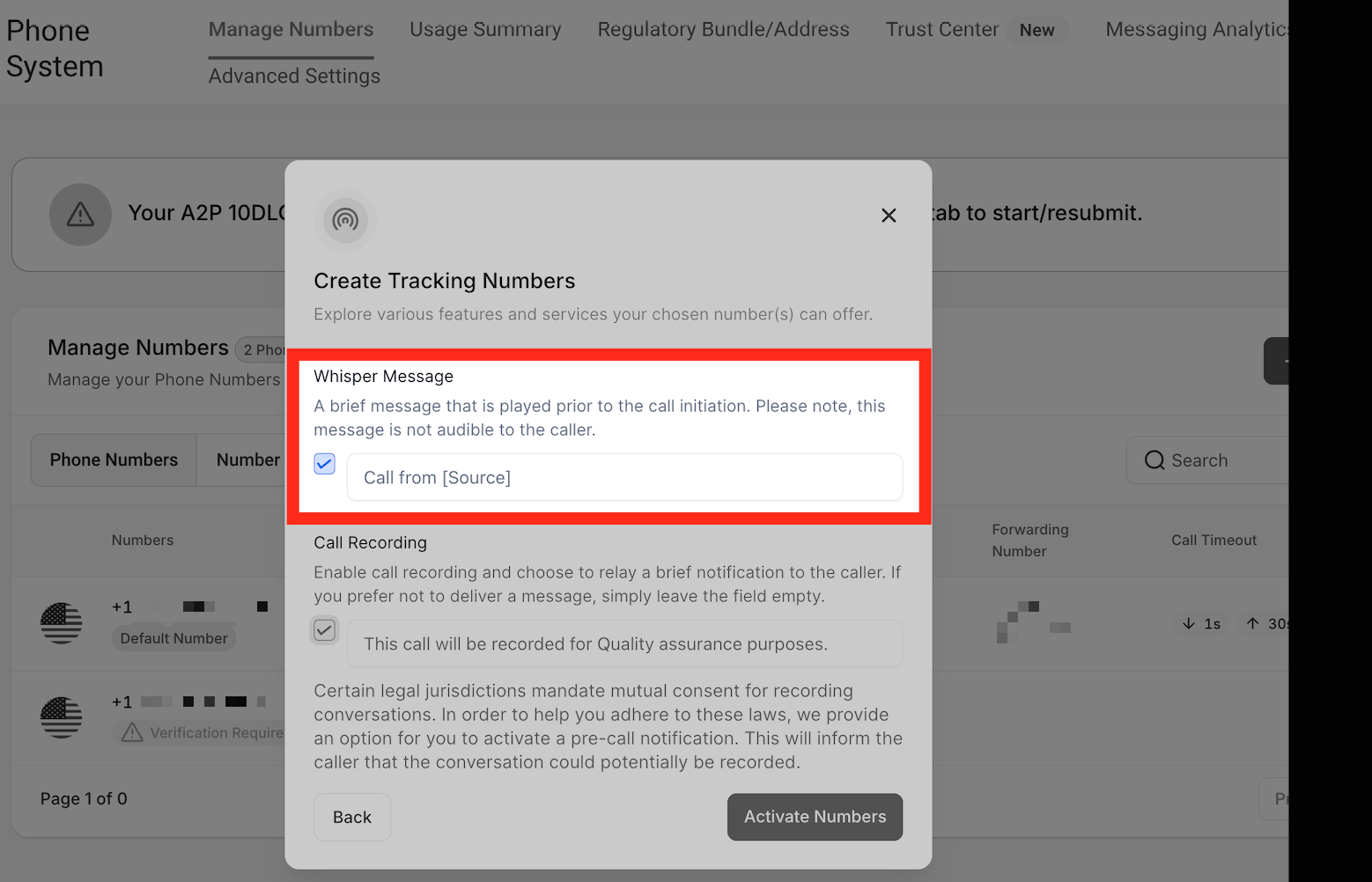
**Whisper Message** — When you receive a call, you will hear this message. If you set the whisper message as "Call from \[Source\]," it will sound something like "Call from a ad campaign." The caller cannot hear this message — it's only for you as a CRM user.
**Set Up a Number Pool for Call Tracking (image 17 of 45)**
This screenshot appears in the "Set Up a Number Pool for Call Tracking" section of "How to Set Up Call Tracking (Number Pool)". For context, this section explains: Call Tracking How to Set Up Call Tracking (Number Pool) Show a unique phone number to leads based on where they came from, so every call can be attributed back to its campaign or landing page. What You'll Learn Number pools are a great way to track the calls driven by paid campaigns. Using number…. This part of the guide covers 3 fields, listed below.
- Fields: The swapping number, The visible phone number on the webpage, The href="tel:..." value
- Controls: gclid, Phone Numbers, "Add Number Pool.", "Visitors Activity", Next: Create Pool, All visitors, Number Name, Pool Size, Forwarding Number, Swapping Number, Next: Choose Numbers, Local Number
Full procedure:
1. The swapping number
2. The visible phone number on the webpage
3. The href="tel:..." value
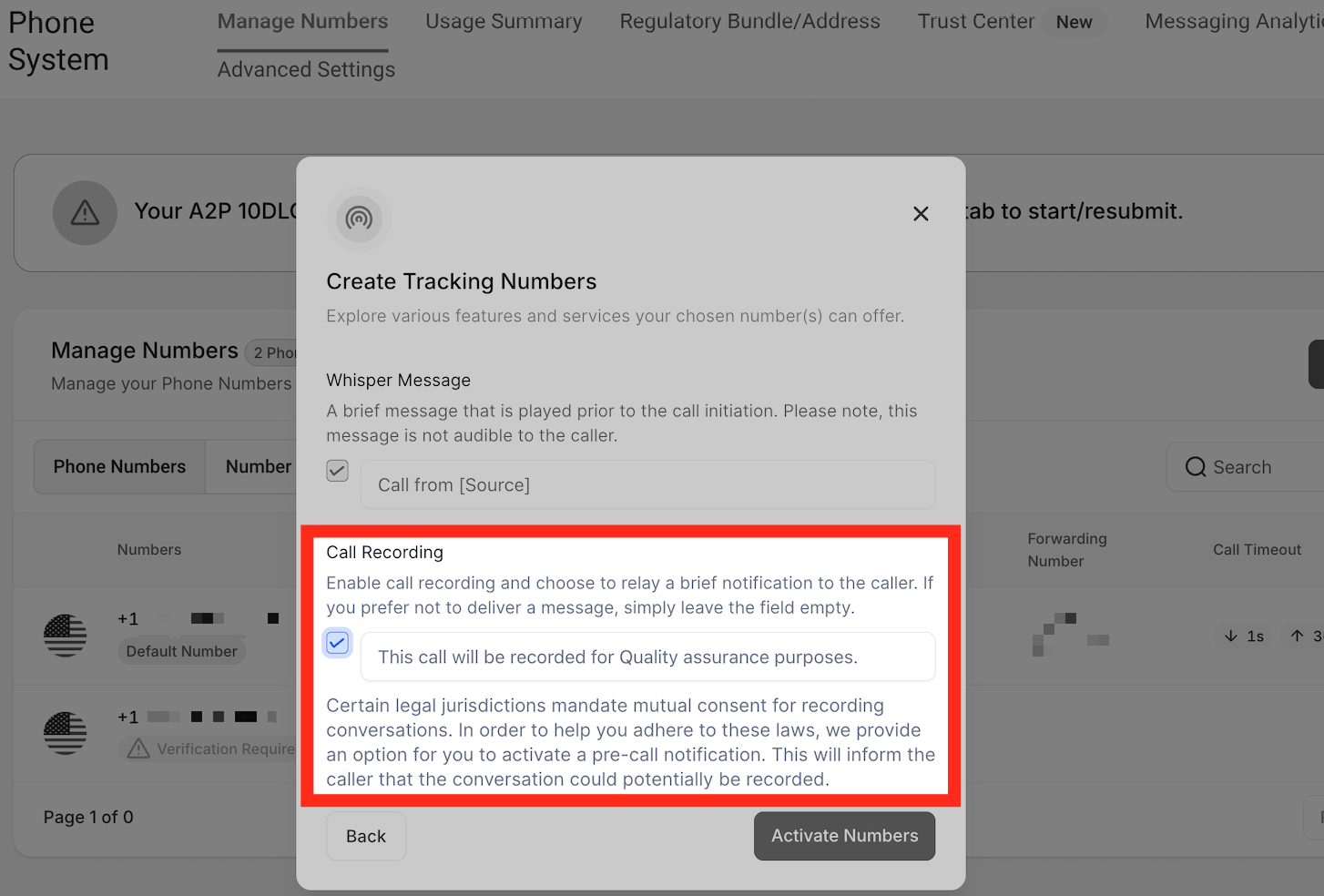
**Call Recording** — Use the checkbox to allow the system to record calls, and customize the message the caller hears, such as "This call will be recorded for quality assurance purposes."
**Set Up a Number Pool for Call Tracking (image 18 of 45)**
This screenshot appears in the "Set Up a Number Pool for Call Tracking" section of "How to Set Up Call Tracking (Number Pool)". For context, this section explains: Call Tracking How to Set Up Call Tracking (Number Pool) Show a unique phone number to leads based on where they came from, so every call can be attributed back to its campaign or landing page. What You'll Learn Number pools are a great way to track the calls driven by paid campaigns. Using number…. This part of the guide covers 3 fields, listed below.
- Fields: The swapping number, The visible phone number on the webpage, The href="tel:..." value
- Controls: gclid, Phone Numbers, "Add Number Pool.", "Visitors Activity", Next: Create Pool, All visitors, Number Name, Pool Size, Forwarding Number, Swapping Number, Next: Choose Numbers, Local Number
Full procedure:
1. The swapping number
2. The visible phone number on the webpage
3. The href="tel:..." value
Step 8
Activate the Number Pool
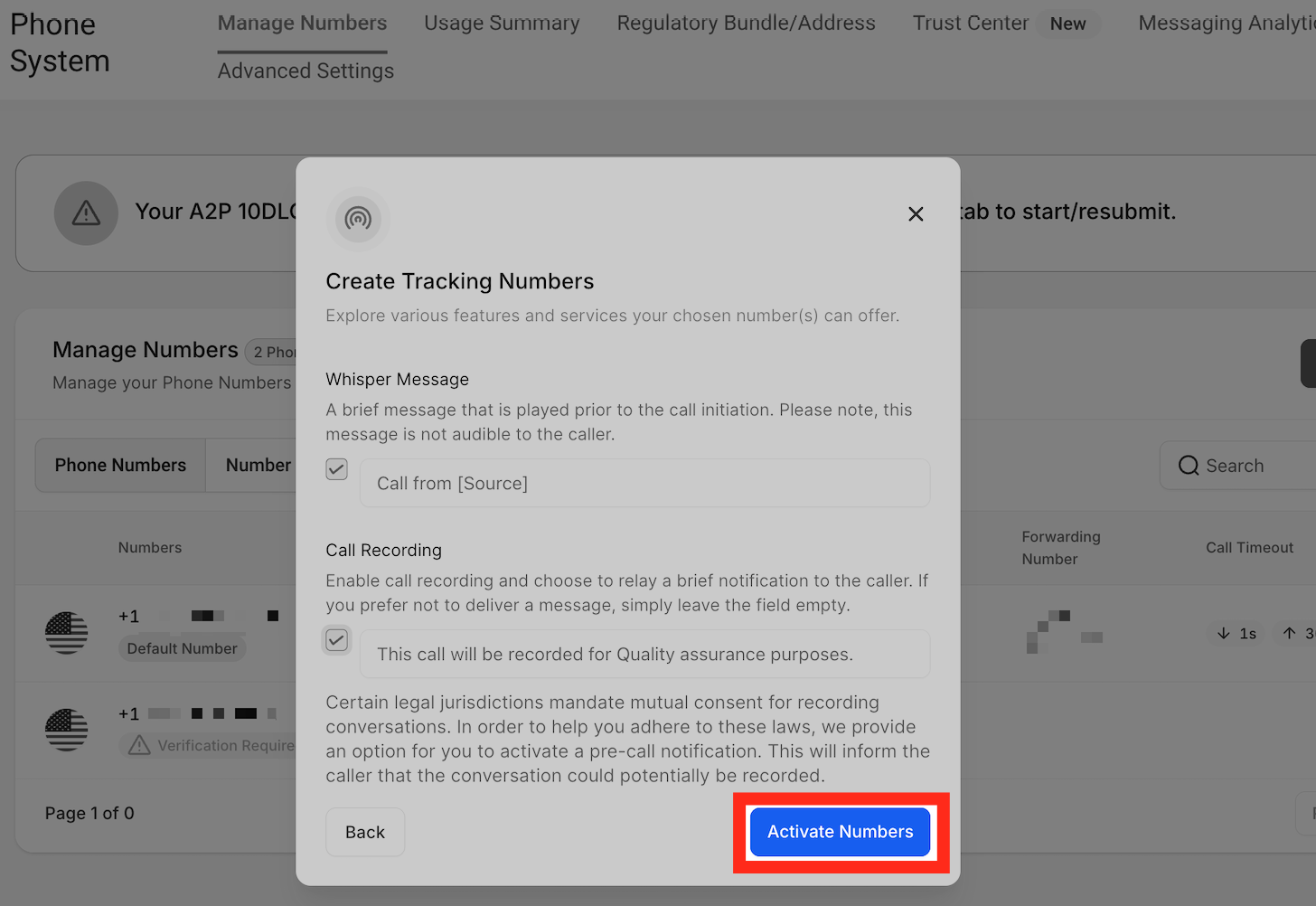
Click on **Activate Number**.
**Set Up a Number Pool for Call Tracking (image 19 of 45)**
This screenshot appears in the "Set Up a Number Pool for Call Tracking" section of "How to Set Up Call Tracking (Number Pool)". For context, this section explains: Call Tracking How to Set Up Call Tracking (Number Pool) Show a unique phone number to leads based on where they came from, so every call can be attributed back to its campaign or landing page. What You'll Learn Number pools are a great way to track the calls driven by paid campaigns. Using number…. This part of the guide covers 3 fields, listed below.
- Fields: The swapping number, The visible phone number on the webpage, The href="tel:..." value
- Controls: gclid, Phone Numbers, "Add Number Pool.", "Visitors Activity", Next: Create Pool, All visitors, Number Name, Pool Size, Forwarding Number, Swapping Number, Next: Choose Numbers, Local Number
Full procedure:
1. The swapping number
2. The visible phone number on the webpage
3. The href="tel:..." value
## 2Integrate the Tracking Snippet on Your Website
Once you set up the number pool, you will need to integrate the snippet on your website. Below is the step-by-step process:
Step 1
Copy the Snippet From the Number Pool
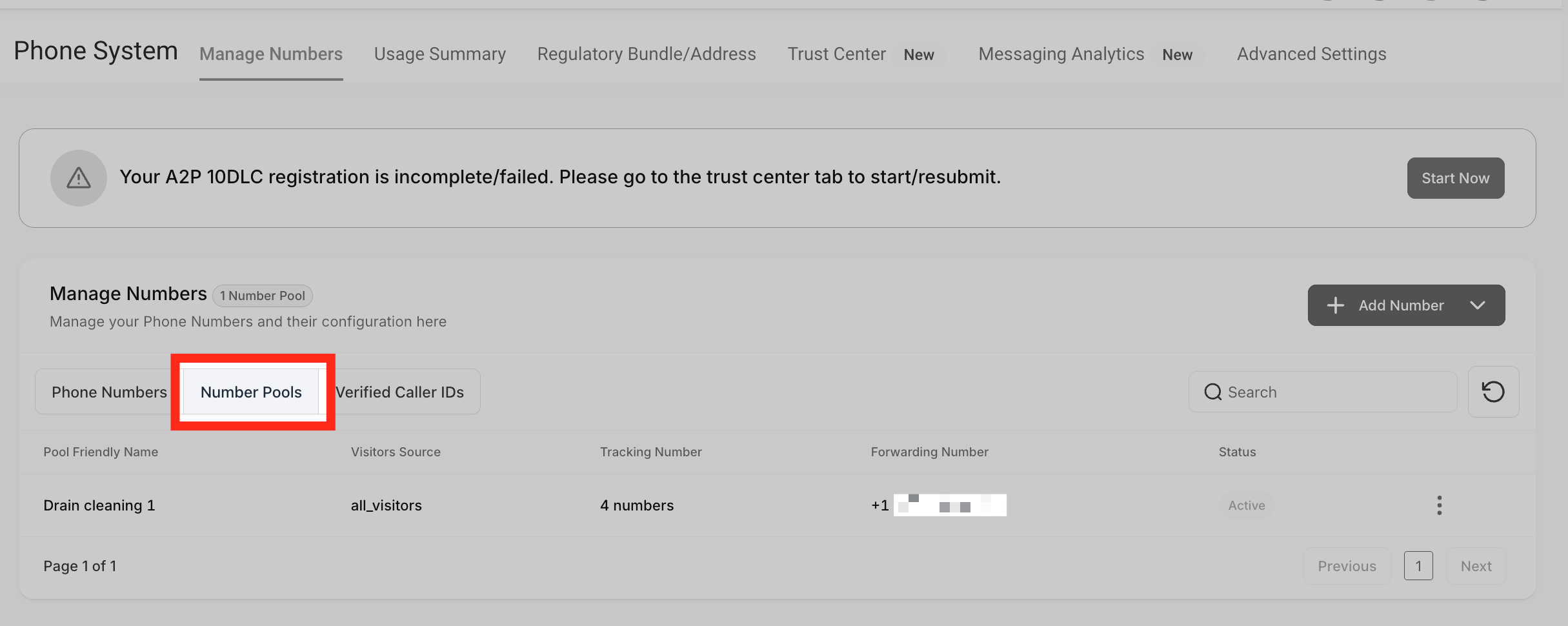
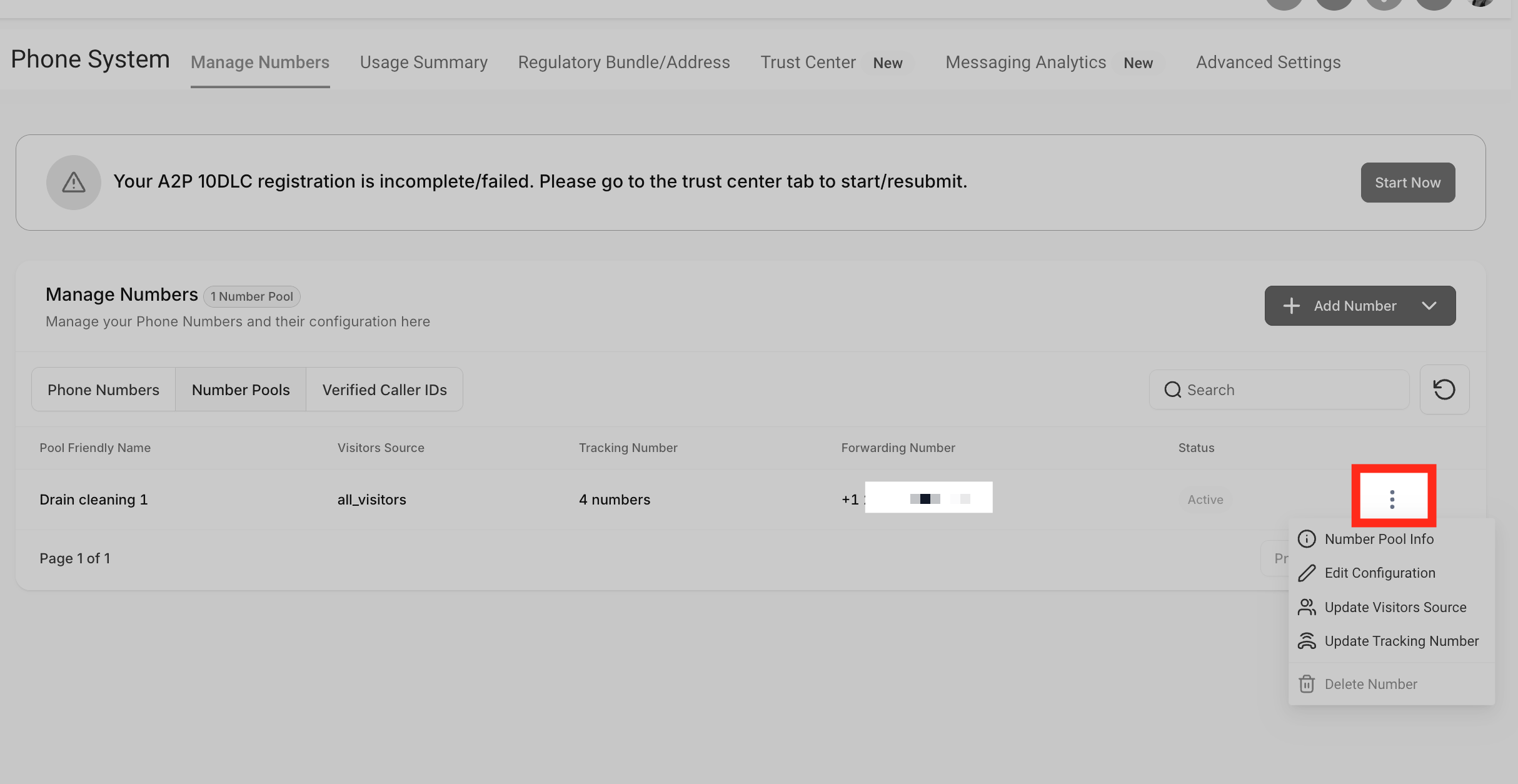
Go to **Number Pools**. Go to the number pool you want to use, then click the three dots.
**Integrate the Tracking Snippet on Your Website (image 20 of 45)**
This screenshot appears in the "Integrate the Tracking Snippet on Your Website" section of "How to Set Up Call Tracking (Number Pool)". For context, this section explains: Call Tracking How to Set Up Call Tracking (Number Pool) Show a unique phone number to leads based on where they came from, so every call can be attributed back to its campaign or landing page. What You'll Learn Number pools are a great way to track the calls driven by paid campaigns. Using number…. This part of the guide covers 3 fields, listed below.
- Fields: The swapping number, The visible phone number on the webpage, The href="tel:..." value
- Controls: gclid, Phone Numbers, "Add Number Pool.", "Visitors Activity", Next: Create Pool, All visitors, Number Name, Pool Size, Forwarding Number, Swapping Number, Next: Choose Numbers, Local Number
Full procedure:
1. The swapping number
2. The visible phone number on the webpage
3. The href="tel:..." value
**Integrate the Tracking Snippet on Your Website (image 21 of 45)**
This screenshot appears in the "Integrate the Tracking Snippet on Your Website" section of "How to Set Up Call Tracking (Number Pool)". For context, this section explains: Call Tracking How to Set Up Call Tracking (Number Pool) Show a unique phone number to leads based on where they came from, so every call can be attributed back to its campaign or landing page. What You'll Learn Number pools are a great way to track the calls driven by paid campaigns. Using number…. This part of the guide covers 3 fields, listed below.
- Fields: The swapping number, The visible phone number on the webpage, The href="tel:..." value
- Controls: gclid, Phone Numbers, "Add Number Pool.", "Visitors Activity", Next: Create Pool, All visitors, Number Name, Pool Size, Forwarding Number, Swapping Number, Next: Choose Numbers, Local Number
Full procedure:
1. The swapping number
2. The visible phone number on the webpage
3. The href="tel:..." value
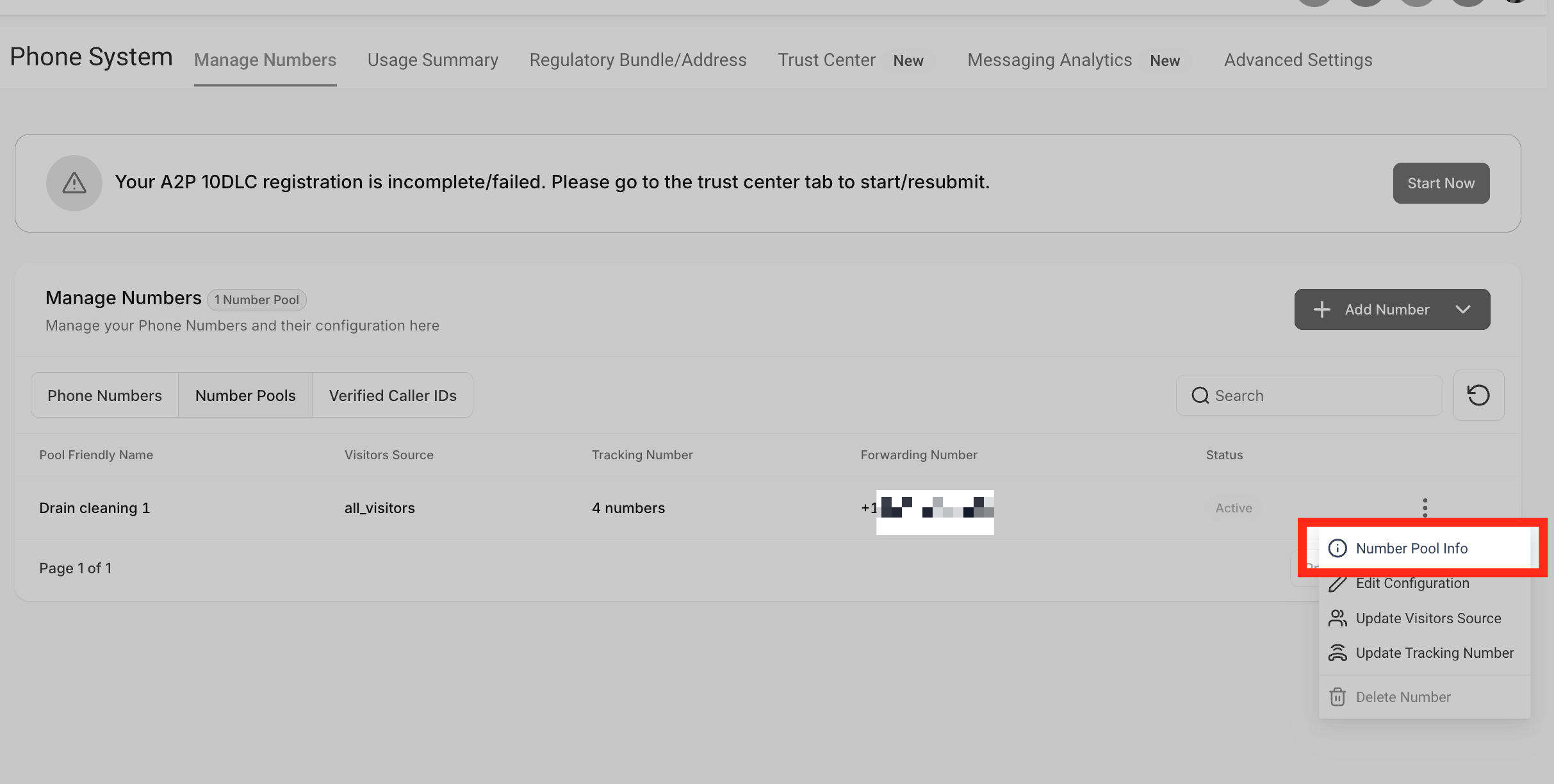
Click **"Number Pool Info."**
**Integrate the Tracking Snippet on Your Website (image 22 of 45)**
This screenshot appears in the "Integrate the Tracking Snippet on Your Website" section of "How to Set Up Call Tracking (Number Pool)". For context, this section explains: Call Tracking How to Set Up Call Tracking (Number Pool) Show a unique phone number to leads based on where they came from, so every call can be attributed back to its campaign or landing page. What You'll Learn Number pools are a great way to track the calls driven by paid campaigns. Using number…. This part of the guide covers 3 fields, listed below.
- Fields: The swapping number, The visible phone number on the webpage, The href="tel:..." value
- Controls: gclid, Phone Numbers, "Add Number Pool.", "Visitors Activity", Next: Create Pool, All visitors, Number Name, Pool Size, Forwarding Number, Swapping Number, Next: Choose Numbers, Local Number
Full procedure:
1. The swapping number
2. The visible phone number on the webpage
3. The href="tel:..." value
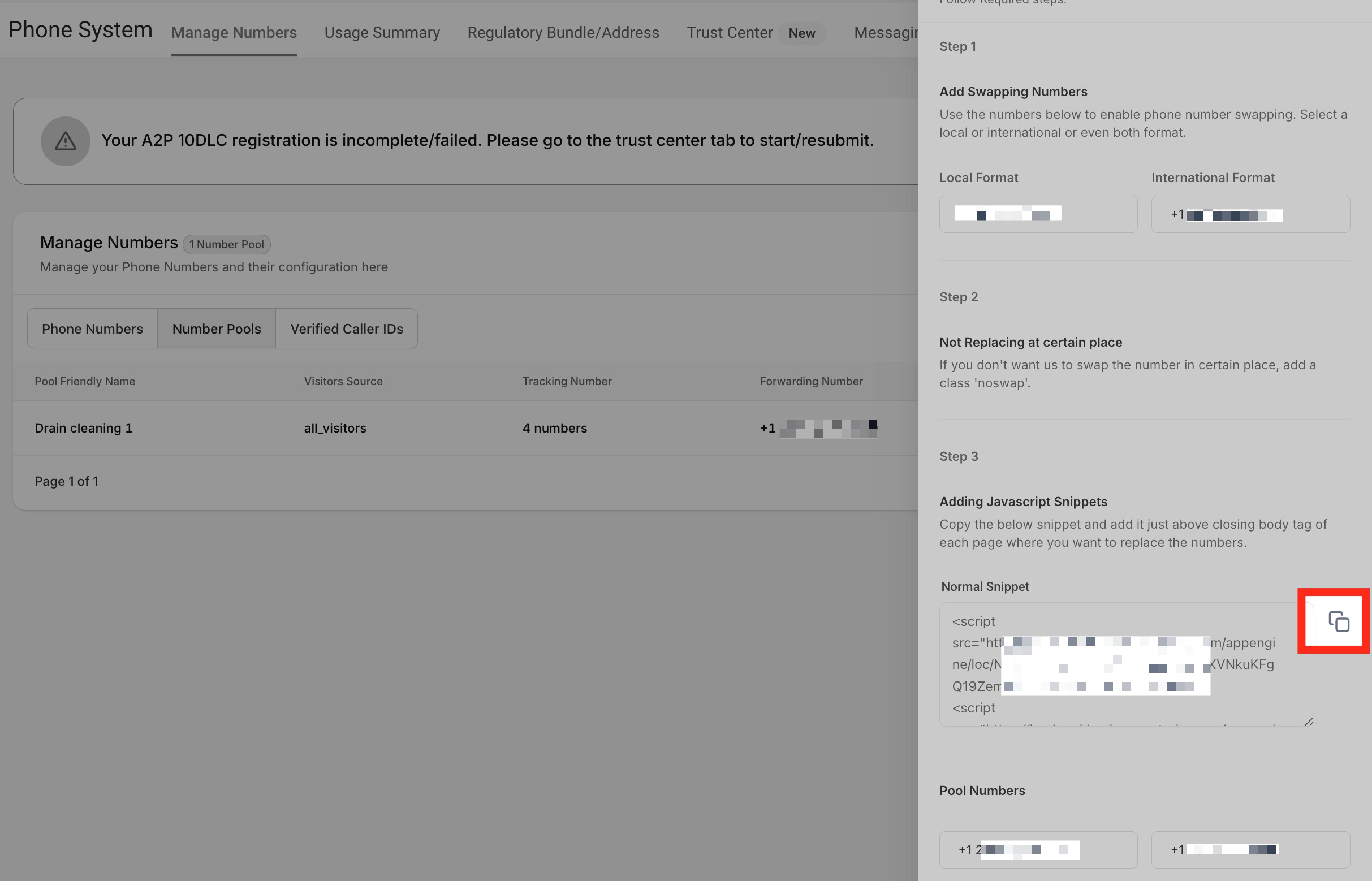
Copy the **"Normal Snippet Code."** This is the code we need to paste onto the Website/Funnel.
**Integrate the Tracking Snippet on Your Website (image 23 of 45)**
This screenshot appears in the "Integrate the Tracking Snippet on Your Website" section of "How to Set Up Call Tracking (Number Pool)". For context, this section explains: Call Tracking How to Set Up Call Tracking (Number Pool) Show a unique phone number to leads based on where they came from, so every call can be attributed back to its campaign or landing page. What You'll Learn Number pools are a great way to track the calls driven by paid campaigns. Using number…. This part of the guide covers 3 fields, listed below.
- Fields: The swapping number, The visible phone number on the webpage, The href="tel:..." value
- Controls: gclid, Phone Numbers, "Add Number Pool.", "Visitors Activity", Next: Create Pool, All visitors, Number Name, Pool Size, Forwarding Number, Swapping Number, Next: Choose Numbers, Local Number
Full procedure:
1. The swapping number
2. The visible phone number on the webpage
3. The href="tel:..." value
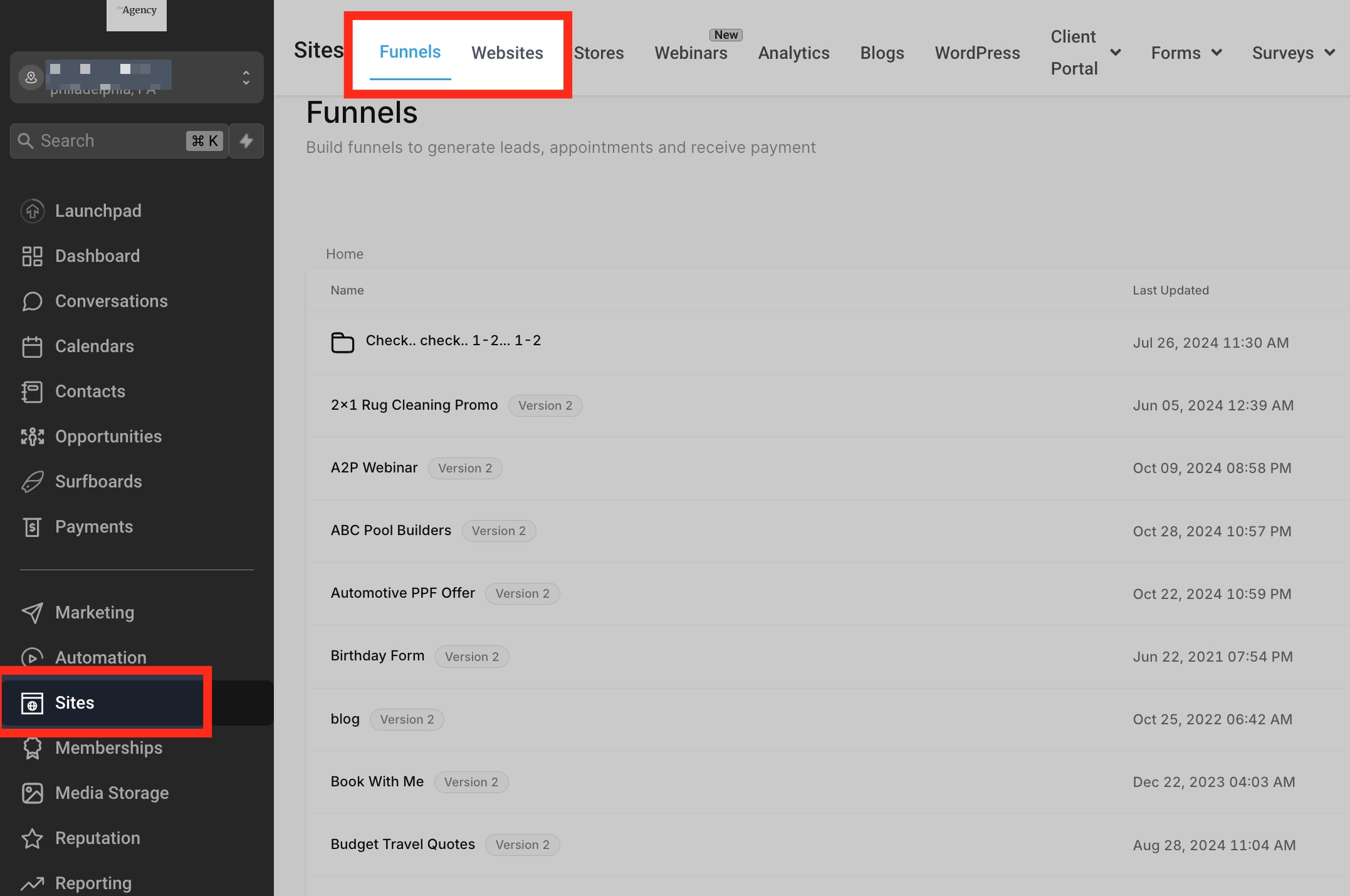
Head over to **"Sites"** section. Click on Funnels or Websites.
**Integrate the Tracking Snippet on Your Website (image 24 of 45)**
This screenshot appears in the "Integrate the Tracking Snippet on Your Website" section of "How to Set Up Call Tracking (Number Pool)". For context, this section explains: Call Tracking How to Set Up Call Tracking (Number Pool) Show a unique phone number to leads based on where they came from, so every call can be attributed back to its campaign or landing page. What You'll Learn Number pools are a great way to track the calls driven by paid campaigns. Using number…. This part of the guide covers 3 fields, listed below.
- Fields: The swapping number, The visible phone number on the webpage, The href="tel:..." value
- Controls: gclid, Phone Numbers, "Add Number Pool.", "Visitors Activity", Next: Create Pool, All visitors, Number Name, Pool Size, Forwarding Number, Swapping Number, Next: Choose Numbers, Local Number
Full procedure:
1. The swapping number
2. The visible phone number on the webpage
3. The href="tel:..." value
Step 2
Paste the Snippet Into Your Site or Funnel
Click on **Funnels** or **Websites**. Click the funnel where you want to use the number pool.
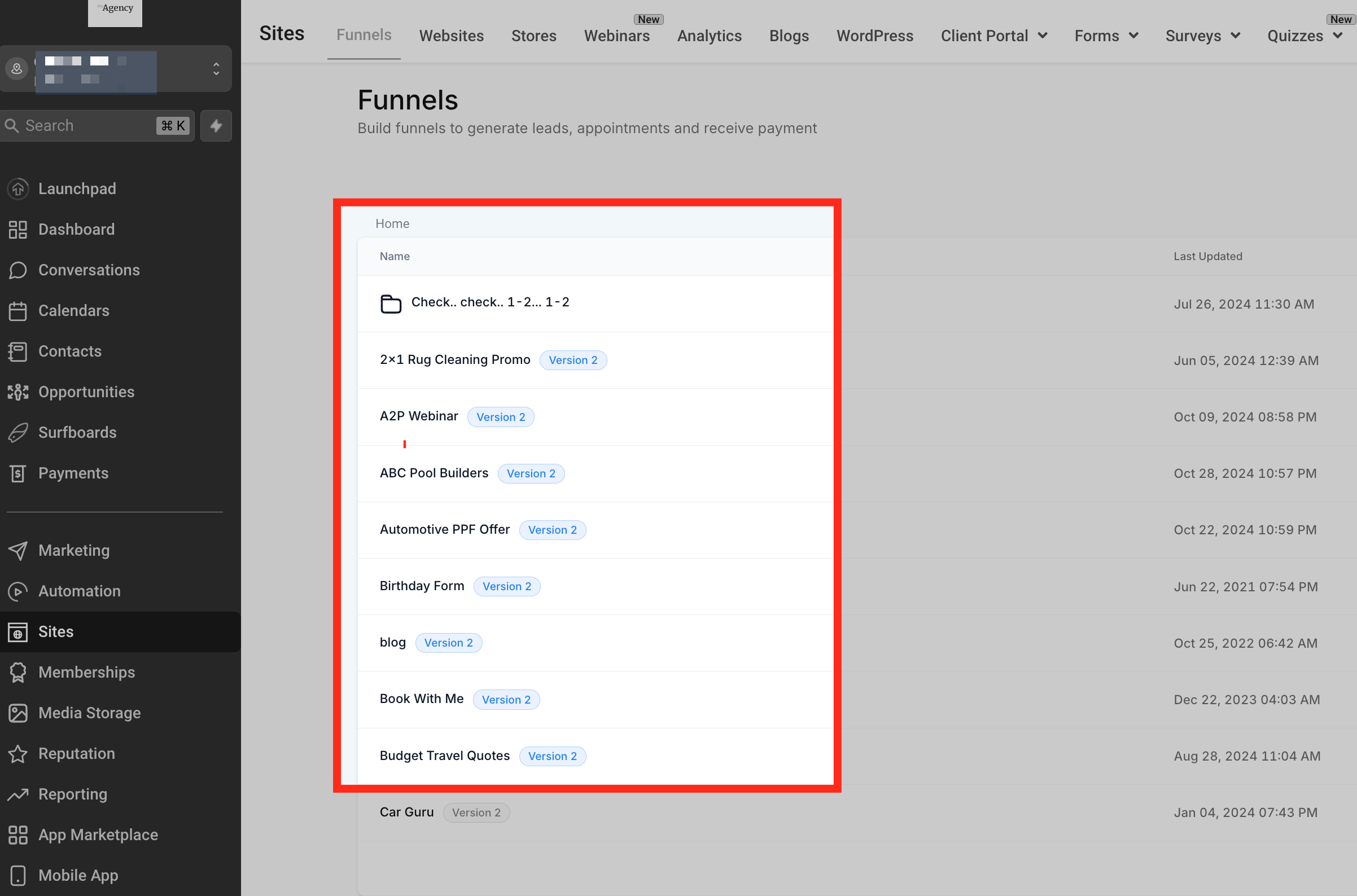
**Integrate the Tracking Snippet on Your Website (image 25 of 45)**
This screenshot appears in the "Integrate the Tracking Snippet on Your Website" section of "How to Set Up Call Tracking (Number Pool)". For context, this section explains: Call Tracking How to Set Up Call Tracking (Number Pool) Show a unique phone number to leads based on where they came from, so every call can be attributed back to its campaign or landing page. What You'll Learn Number pools are a great way to track the calls driven by paid campaigns. Using number…. This part of the guide covers 3 fields, listed below.
- Fields: The swapping number, The visible phone number on the webpage, The href="tel:..." value
- Controls: gclid, Phone Numbers, "Add Number Pool.", "Visitors Activity", Next: Create Pool, All visitors, Number Name, Pool Size, Forwarding Number, Swapping Number, Next: Choose Numbers, Local Number
Full procedure:
1. The swapping number
2. The visible phone number on the webpage
3. The href="tel:..." value
Once you are inside the funnel/website, click the **"Settings"** tab. Now paste the copied Normal snippet at the bottom of your Body Tracking code field.
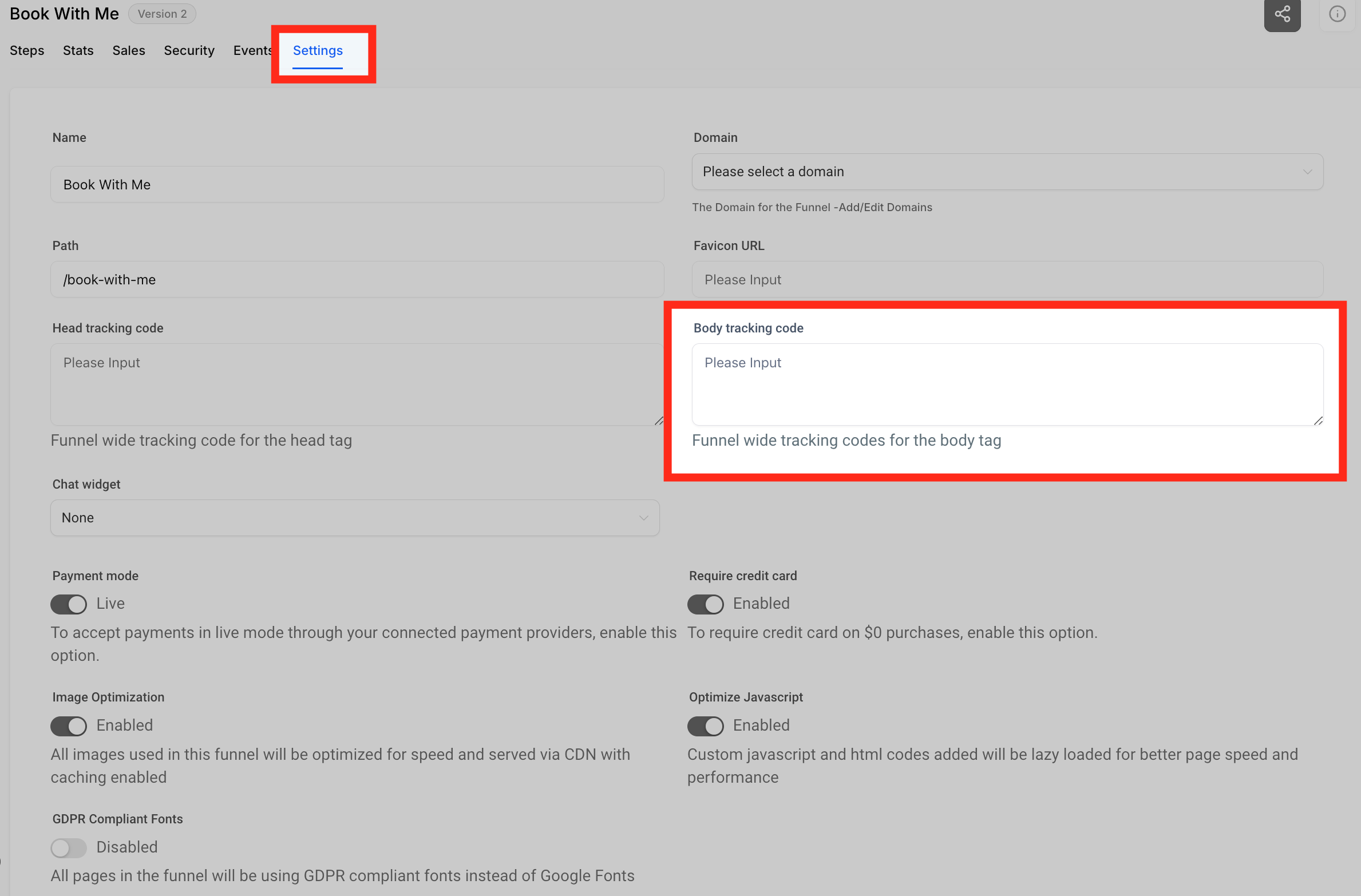
**Integrate the Tracking Snippet on Your Website (image 26 of 45)**
This screenshot appears in the "Integrate the Tracking Snippet on Your Website" section of "How to Set Up Call Tracking (Number Pool)". For context, this section explains: Call Tracking How to Set Up Call Tracking (Number Pool) Show a unique phone number to leads based on where they came from, so every call can be attributed back to its campaign or landing page. What You'll Learn Number pools are a great way to track the calls driven by paid campaigns. Using number…. This part of the guide covers 3 fields, listed below.
- Fields: The swapping number, The visible phone number on the webpage, The href="tel:..." value
- Controls: gclid, Phone Numbers, "Add Number Pool.", "Visitors Activity", Next: Create Pool, All visitors, Number Name, Pool Size, Forwarding Number, Swapping Number, Next: Choose Numbers, Local Number
Full procedure:
1. The swapping number
2. The visible phone number on the webpage
3. The href="tel:..." value
Click **Save**. This will swap the number within the entire Funnel/Website.
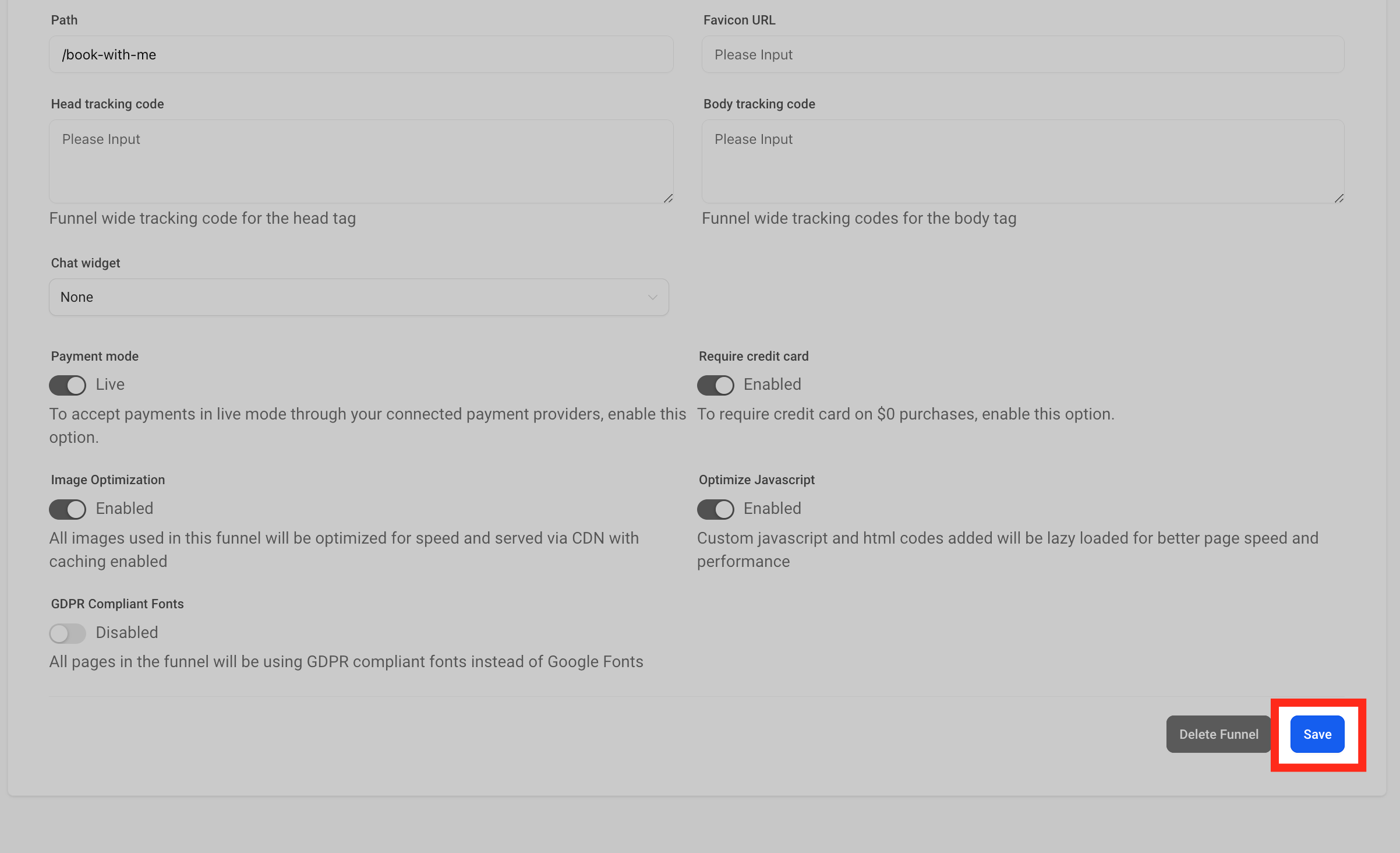
**Integrate the Tracking Snippet on Your Website (image 27 of 45)**
This screenshot appears in the "Integrate the Tracking Snippet on Your Website" section of "How to Set Up Call Tracking (Number Pool)". For context, this section explains: Call Tracking How to Set Up Call Tracking (Number Pool) Show a unique phone number to leads based on where they came from, so every call can be attributed back to its campaign or landing page. What You'll Learn Number pools are a great way to track the calls driven by paid campaigns. Using number…. This part of the guide covers 3 fields, listed below.
- Fields: The swapping number, The visible phone number on the webpage, The href="tel:..." value
- Controls: gclid, Phone Numbers, "Add Number Pool.", "Visitors Activity", Next: Create Pool, All visitors, Number Name, Pool Size, Forwarding Number, Swapping Number, Next: Choose Numbers, Local Number
Full procedure:
1. The swapping number
2. The visible phone number on the webpage
3. The href="tel:..." value
Step 3 · Optional
Apply Tracking to a Single Page Only
If you want the number to swap on one single funnel/website page instead, click the Tracking Code icon at the top left side.
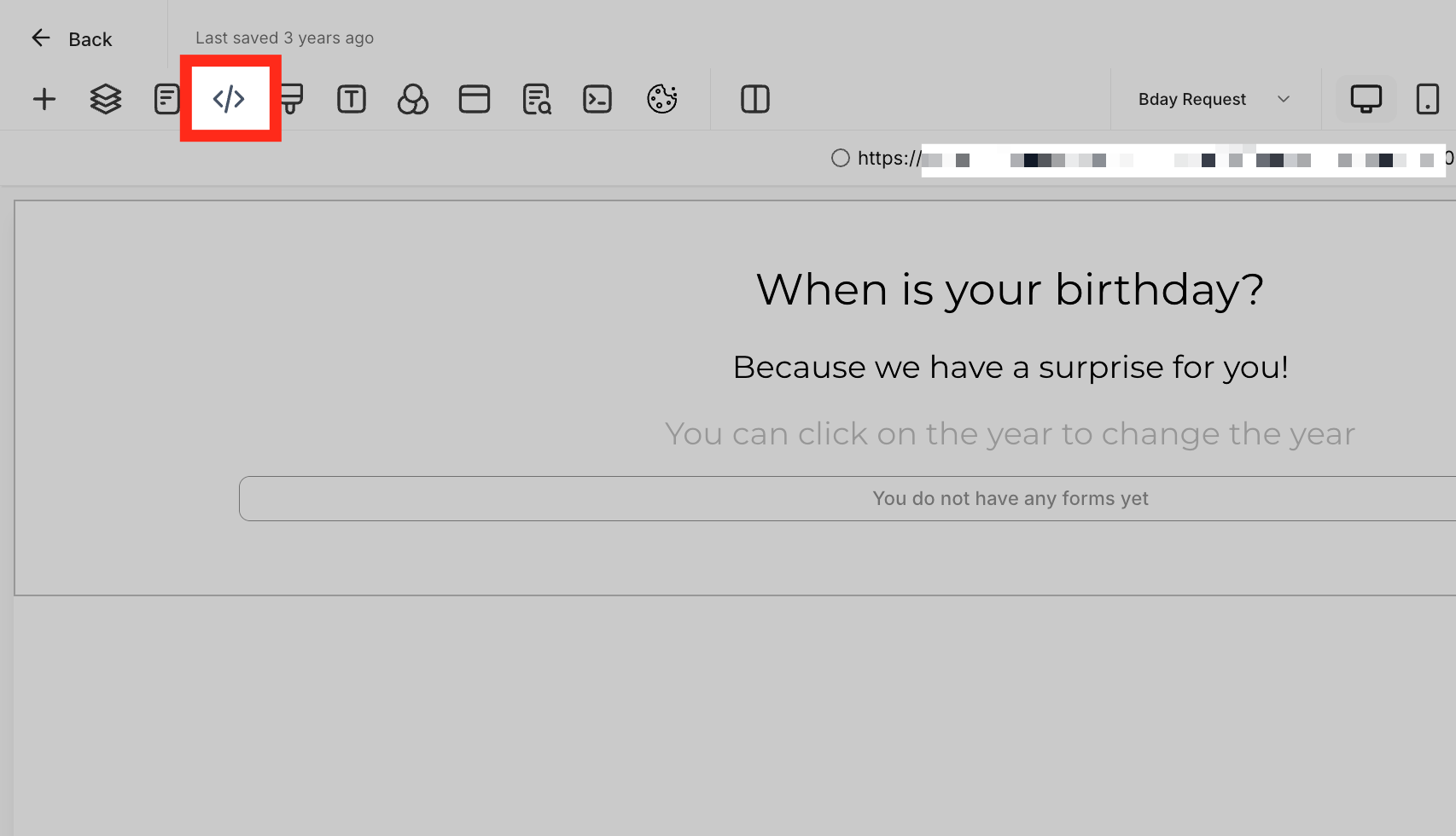
**Integrate the Tracking Snippet on Your Website (image 28 of 45)**
This screenshot appears in the "Integrate the Tracking Snippet on Your Website" section of "How to Set Up Call Tracking (Number Pool)". For context, this section explains: Call Tracking How to Set Up Call Tracking (Number Pool) Show a unique phone number to leads based on where they came from, so every call can be attributed back to its campaign or landing page. What You'll Learn Number pools are a great way to track the calls driven by paid campaigns. Using number…. This part of the guide covers 3 fields, listed below.
- Fields: The swapping number, The visible phone number on the webpage, The href="tel:..." value
- Controls: gclid, Phone Numbers, "Add Number Pool.", "Visitors Activity", Next: Create Pool, All visitors, Number Name, Pool Size, Forwarding Number, Swapping Number, Next: Choose Numbers, Local Number
Full procedure:
1. The swapping number
2. The visible phone number on the webpage
3. The href="tel:..." value
Click the **"Footer Tracking"** option on the right side, then paste the code in the code editor.

**Integrate the Tracking Snippet on Your Website (image 29 of 45)**
This screenshot appears in the "Integrate the Tracking Snippet on Your Website" section of "How to Set Up Call Tracking (Number Pool)". For context, this section explains: Call Tracking How to Set Up Call Tracking (Number Pool) Show a unique phone number to leads based on where they came from, so every call can be attributed back to its campaign or landing page. What You'll Learn Number pools are a great way to track the calls driven by paid campaigns. Using number…. This part of the guide covers 3 fields, listed below.
- Fields: The swapping number, The visible phone number on the webpage, The href="tel:..." value
- Controls: gclid, Phone Numbers, "Add Number Pool.", "Visitors Activity", Next: Create Pool, All visitors, Number Name, Pool Size, Forwarding Number, Swapping Number, Next: Choose Numbers, Local Number
Full procedure:
1. The swapping number
2. The visible phone number on the webpage
3. The href="tel:..." value

**Integrate the Tracking Snippet on Your Website (image 30 of 45)**
This screenshot appears in the "Integrate the Tracking Snippet on Your Website" section of "How to Set Up Call Tracking (Number Pool)". For context, this section explains: Call Tracking How to Set Up Call Tracking (Number Pool) Show a unique phone number to leads based on where they came from, so every call can be attributed back to its campaign or landing page. What You'll Learn Number pools are a great way to track the calls driven by paid campaigns. Using number…. This part of the guide covers 3 fields, listed below.
- Fields: The swapping number, The visible phone number on the webpage, The href="tel:..." value
- Controls: gclid, Phone Numbers, "Add Number Pool.", "Visitors Activity", Next: Create Pool, All visitors, Number Name, Pool Size, Forwarding Number, Swapping Number, Next: Choose Numbers, Local Number
Full procedure:
1. The swapping number
2. The visible phone number on the webpage
3. The href="tel:..." value
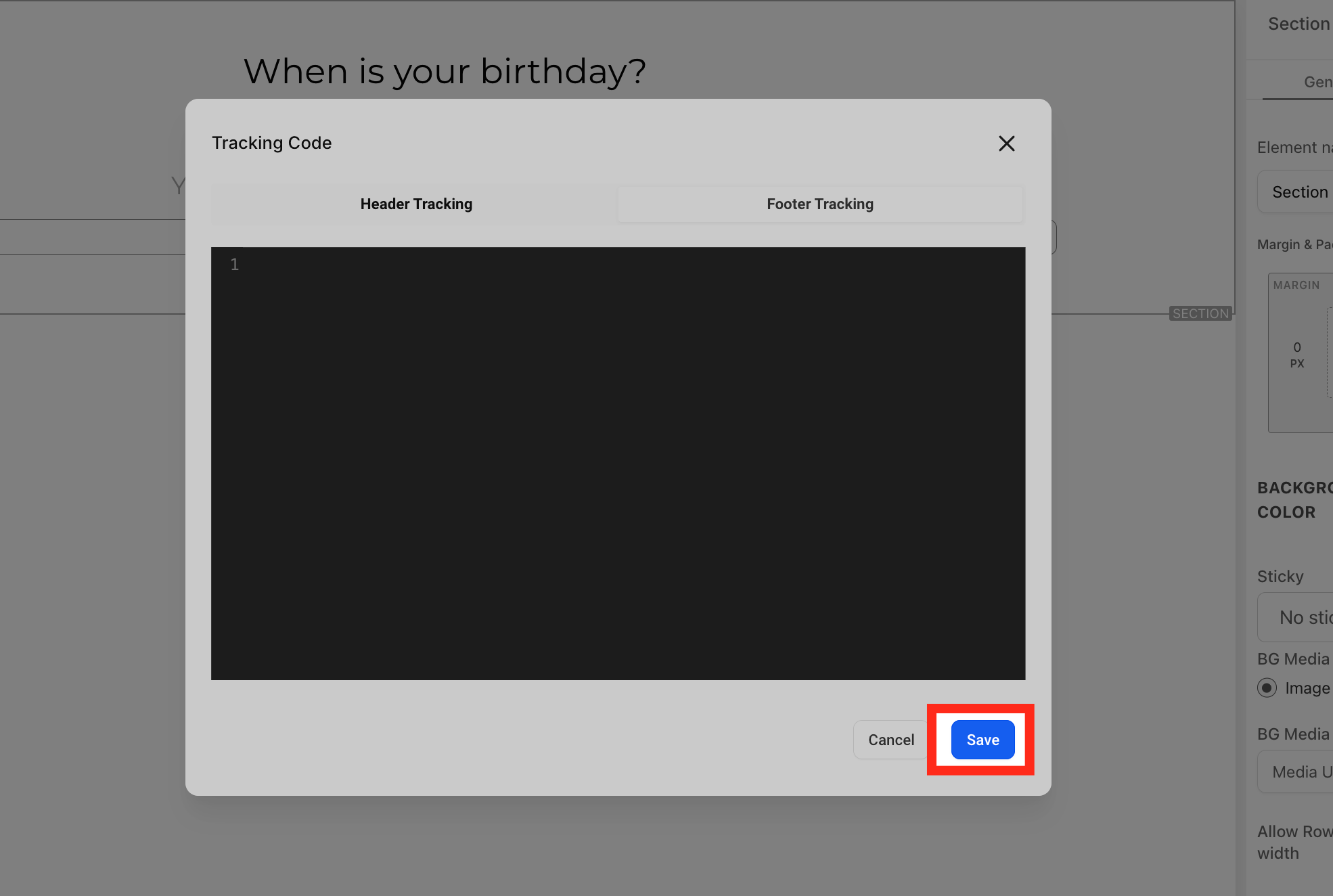
Click **"Save"** to proceed ahead.
**Integrate the Tracking Snippet on Your Website (image 31 of 45)**
This screenshot appears in the "Integrate the Tracking Snippet on Your Website" section of "How to Set Up Call Tracking (Number Pool)". For context, this section explains: Call Tracking How to Set Up Call Tracking (Number Pool) Show a unique phone number to leads based on where they came from, so every call can be attributed back to its campaign or landing page. What You'll Learn Number pools are a great way to track the calls driven by paid campaigns. Using number…. This part of the guide covers 3 fields, listed below.
- Fields: The swapping number, The visible phone number on the webpage, The href="tel:..." value
- Controls: gclid, Phone Numbers, "Add Number Pool.", "Visitors Activity", Next: Create Pool, All visitors, Number Name, Pool Size, Forwarding Number, Swapping Number, Next: Choose Numbers, Local Number
Full procedure:
1. The swapping number
2. The visible phone number on the webpage
3. The href="tel:..." value
Step 4
Update the Swapping Number Later, If Needed
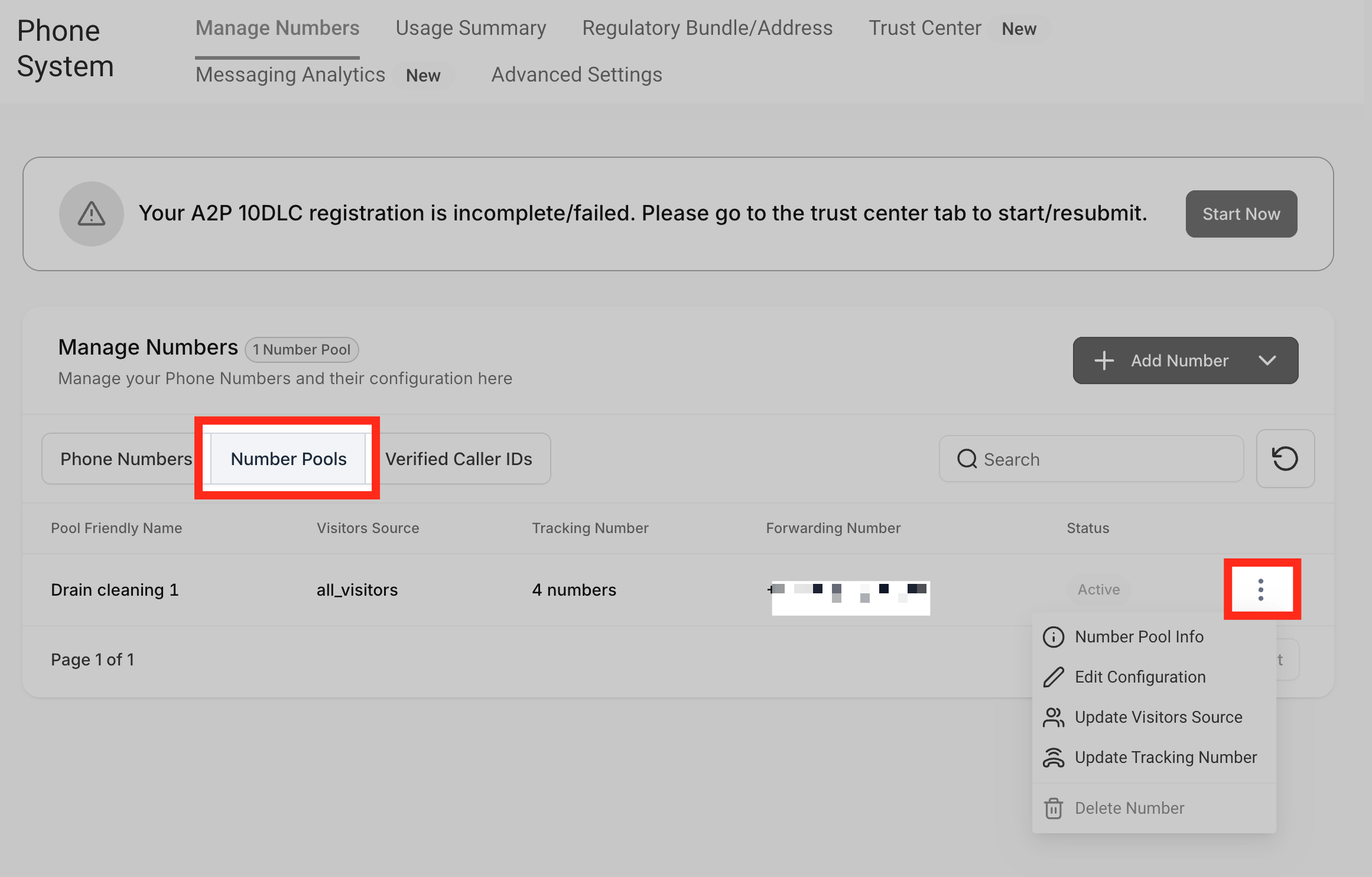
Go back to your number pool setup. Hover over the number pool you just created and click the three dots menu.
**Integrate the Tracking Snippet on Your Website (image 32 of 45)**
This screenshot appears in the "Integrate the Tracking Snippet on Your Website" section of "How to Set Up Call Tracking (Number Pool)". For context, this section explains: Call Tracking How to Set Up Call Tracking (Number Pool) Show a unique phone number to leads based on where they came from, so every call can be attributed back to its campaign or landing page. What You'll Learn Number pools are a great way to track the calls driven by paid campaigns. Using number…. This part of the guide covers 3 fields, listed below.
- Fields: The swapping number, The visible phone number on the webpage, The href="tel:..." value
- Controls: gclid, Phone Numbers, "Add Number Pool.", "Visitors Activity", Next: Create Pool, All visitors, Number Name, Pool Size, Forwarding Number, Swapping Number, Next: Choose Numbers, Local Number
Full procedure:
1. The swapping number
2. The visible phone number on the webpage
3. The href="tel:..." value
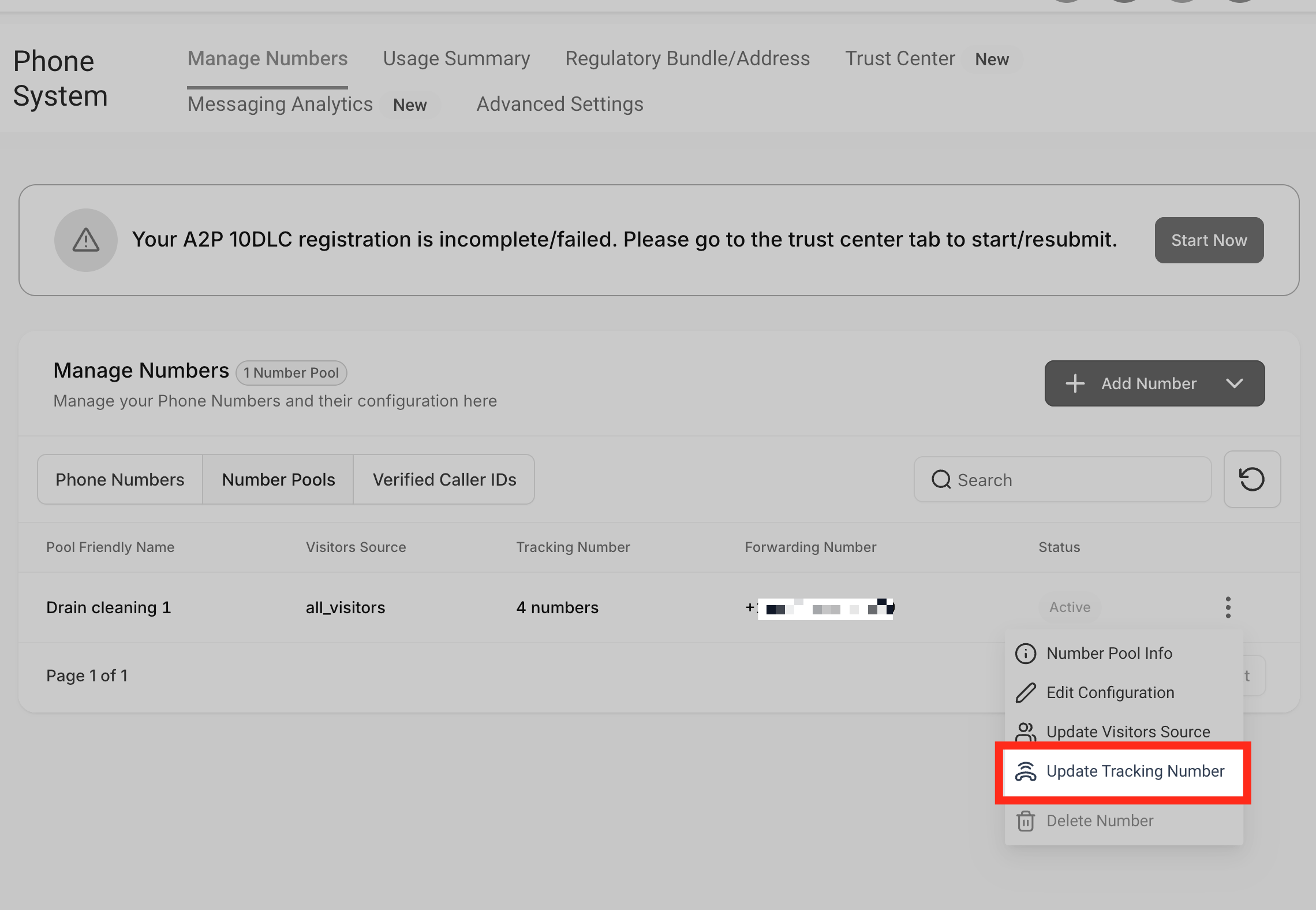
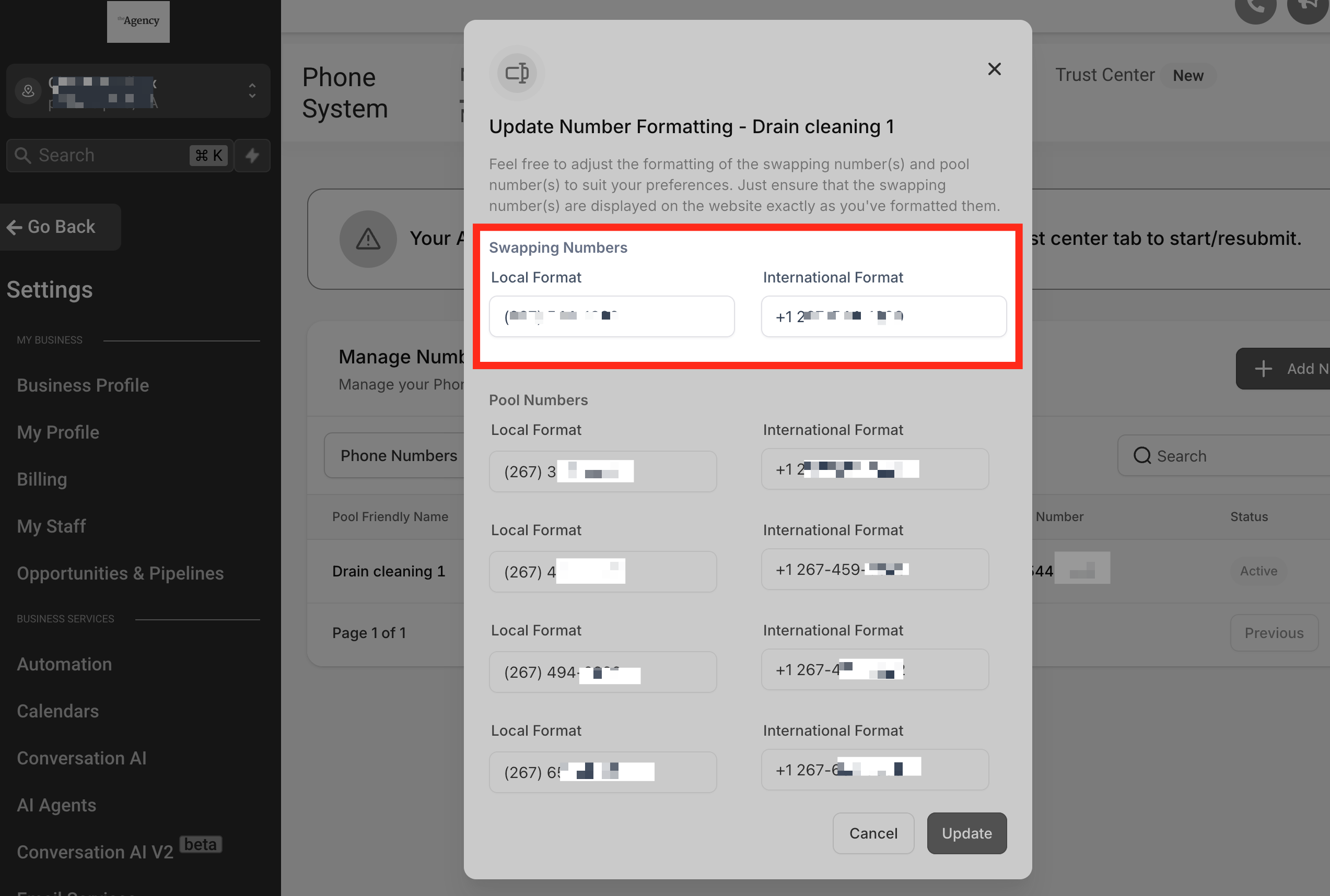
Click on **"Update Tracking Number."** Copy the swapping number and paste it on the Funnels/websites.
**Integrate the Tracking Snippet on Your Website (image 33 of 45)**
This screenshot appears in the "Integrate the Tracking Snippet on Your Website" section of "How to Set Up Call Tracking (Number Pool)". For context, this section explains: Call Tracking How to Set Up Call Tracking (Number Pool) Show a unique phone number to leads based on where they came from, so every call can be attributed back to its campaign or landing page. What You'll Learn Number pools are a great way to track the calls driven by paid campaigns. Using number…. This part of the guide covers 3 fields, listed below.
- Fields: The swapping number, The visible phone number on the webpage, The href="tel:..." value
- Controls: gclid, Phone Numbers, "Add Number Pool.", "Visitors Activity", Next: Create Pool, All visitors, Number Name, Pool Size, Forwarding Number, Swapping Number, Next: Choose Numbers, Local Number
Full procedure:
1. The swapping number
2. The visible phone number on the webpage
3. The href="tel:..." value
**Integrate the Tracking Snippet on Your Website (image 34 of 45)**
This screenshot appears in the "Integrate the Tracking Snippet on Your Website" section of "How to Set Up Call Tracking (Number Pool)". For context, this section explains: Call Tracking How to Set Up Call Tracking (Number Pool) Show a unique phone number to leads based on where they came from, so every call can be attributed back to its campaign or landing page. What You'll Learn Number pools are a great way to track the calls driven by paid campaigns. Using number…. This part of the guide covers 3 fields, listed below.
- Fields: The swapping number, The visible phone number on the webpage, The href="tel:..." value
- Controls: gclid, Phone Numbers, "Add Number Pool.", "Visitors Activity", Next: Create Pool, All visitors, Number Name, Pool Size, Forwarding Number, Swapping Number, Next: Choose Numbers, Local Number
Full procedure:
1. The swapping number
2. The visible phone number on the webpage
3. The href="tel:..." value
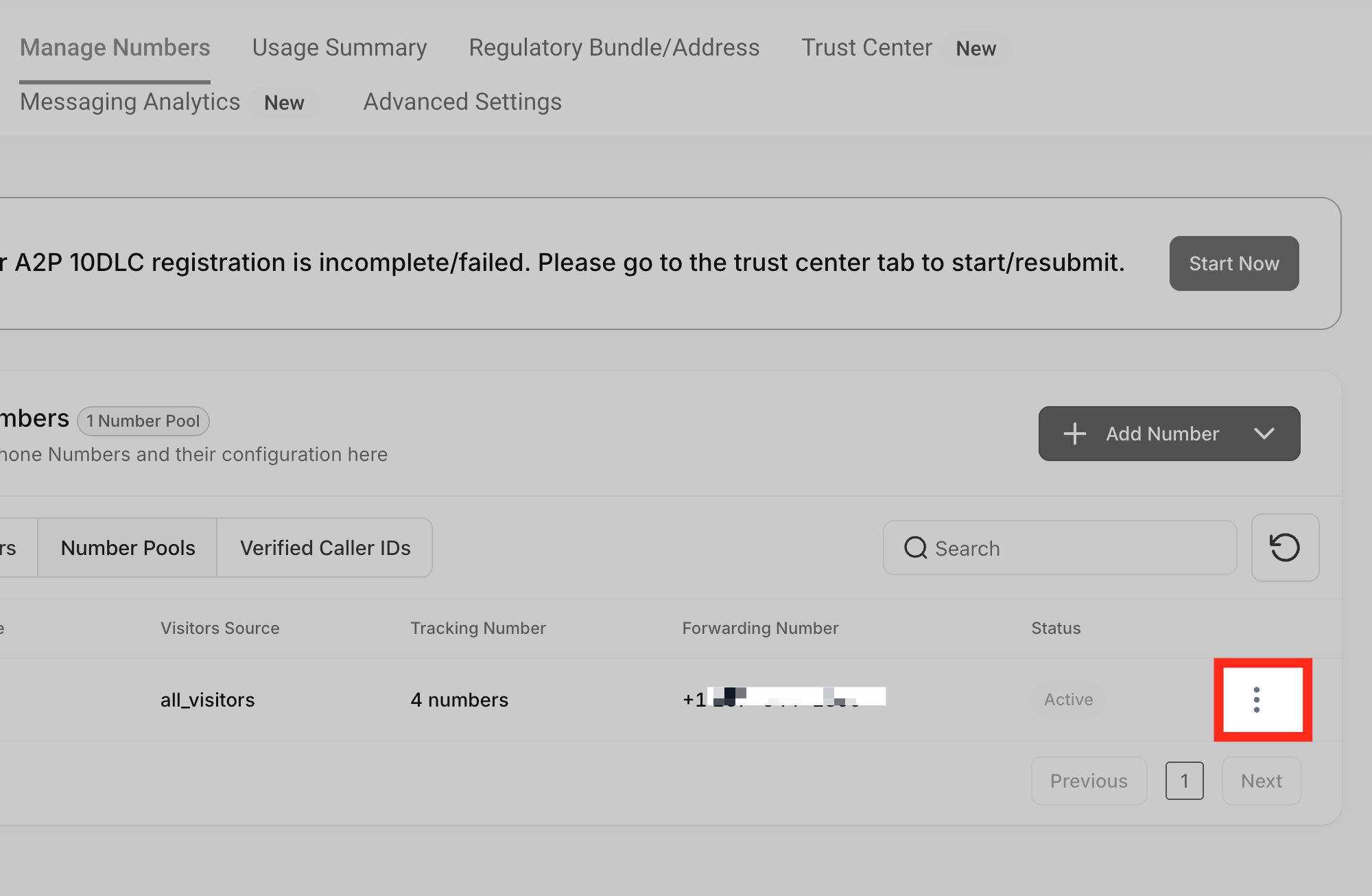
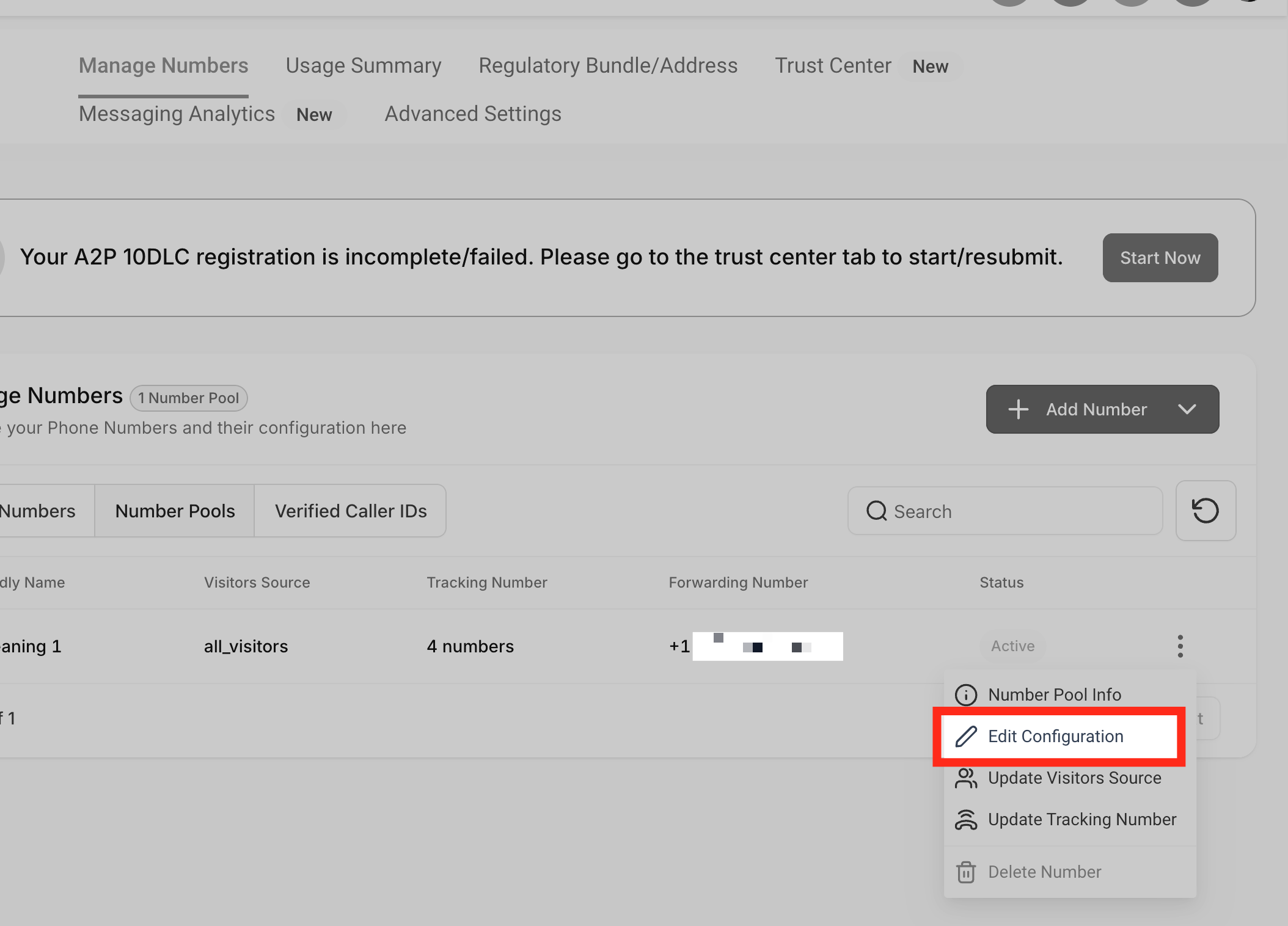
In order to update the swapping number, follow these steps: click the three dots menu, then click **"Edit Configuration."**
**Integrate the Tracking Snippet on Your Website (image 35 of 45)**
This screenshot appears in the "Integrate the Tracking Snippet on Your Website" section of "How to Set Up Call Tracking (Number Pool)". For context, this section explains: Call Tracking How to Set Up Call Tracking (Number Pool) Show a unique phone number to leads based on where they came from, so every call can be attributed back to its campaign or landing page. What You'll Learn Number pools are a great way to track the calls driven by paid campaigns. Using number…. This part of the guide covers 3 fields, listed below.
- Fields: The swapping number, The visible phone number on the webpage, The href="tel:..." value
- Controls: gclid, Phone Numbers, "Add Number Pool.", "Visitors Activity", Next: Create Pool, All visitors, Number Name, Pool Size, Forwarding Number, Swapping Number, Next: Choose Numbers, Local Number
Full procedure:
1. The swapping number
2. The visible phone number on the webpage
3. The href="tel:..." value
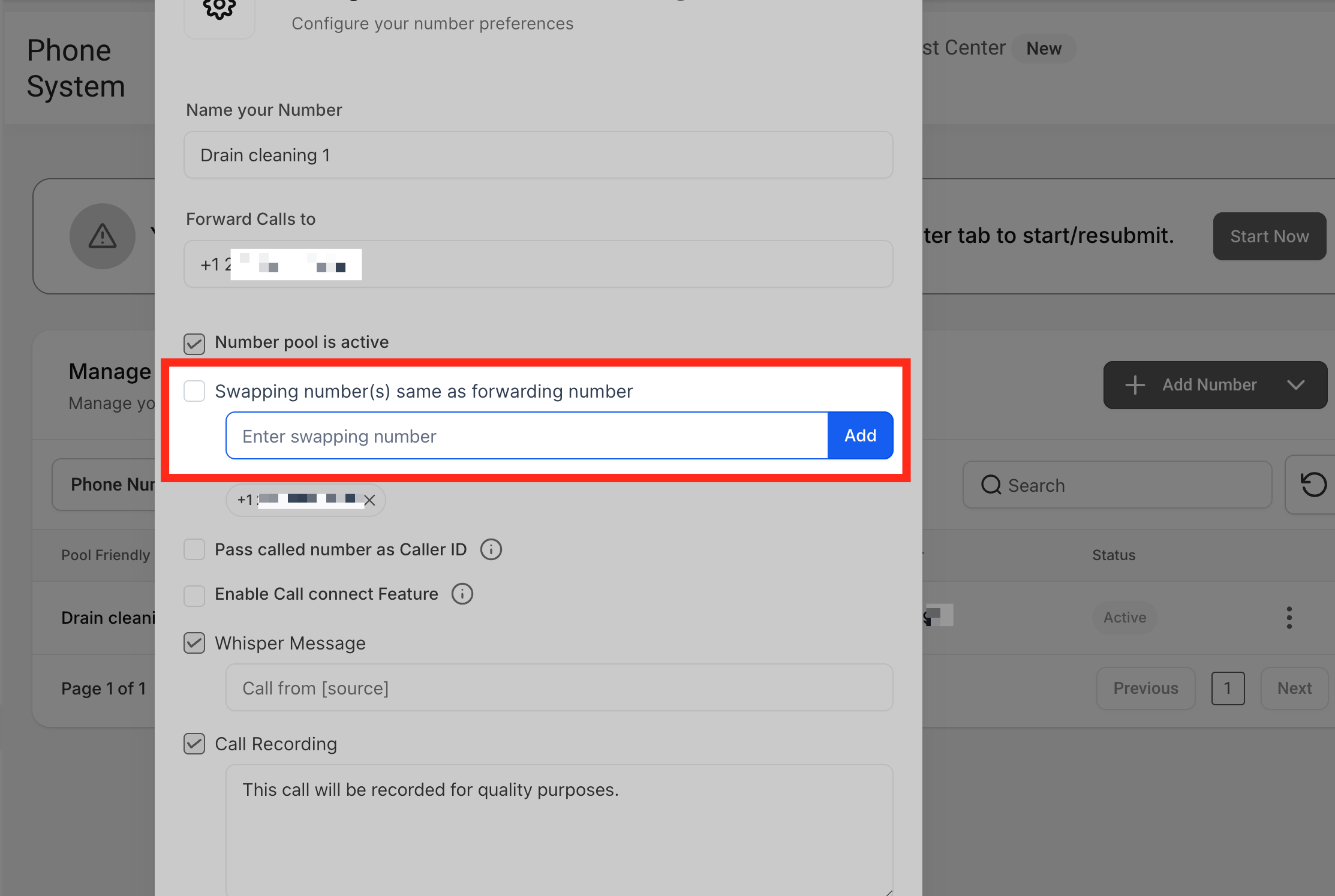
Uncheck the option **"Swapping number(s) same as forwarding number"** and set your own swapping number. Enter the swapping number in the respective field and click the **"Add"** button.
**Integrate the Tracking Snippet on Your Website (image 36 of 45)**
This screenshot appears in the "Integrate the Tracking Snippet on Your Website" section of "How to Set Up Call Tracking (Number Pool)". For context, this section explains: Call Tracking How to Set Up Call Tracking (Number Pool) Show a unique phone number to leads based on where they came from, so every call can be attributed back to its campaign or landing page. What You'll Learn Number pools are a great way to track the calls driven by paid campaigns. Using number…. This part of the guide covers 3 fields, listed below.
- Fields: The swapping number, The visible phone number on the webpage, The href="tel:..." value
- Controls: gclid, Phone Numbers, "Add Number Pool.", "Visitors Activity", Next: Create Pool, All visitors, Number Name, Pool Size, Forwarding Number, Swapping Number, Next: Choose Numbers, Local Number
Full procedure:
1. The swapping number
2. The visible phone number on the webpage
3. The href="tel:..." value
Note:
You cannot use a Twilio/LC phone number as your forwarding number, as this will create a looping issue. Be sure to use a different external number to avoid call routing problems.
**Integrate the Tracking Snippet on Your Website (image 37 of 45)**
This screenshot appears in the "Integrate the Tracking Snippet on Your Website" section of "How to Set Up Call Tracking (Number Pool)". For context, this section explains: Call Tracking How to Set Up Call Tracking (Number Pool) Show a unique phone number to leads based on where they came from, so every call can be attributed back to its campaign or landing page. What You'll Learn Number pools are a great way to track the calls driven by paid campaigns. Using number…. This part of the guide covers 3 fields, listed below.
- Fields: The swapping number, The visible phone number on the webpage, The href="tel:..." value
- Controls: gclid, Phone Numbers, "Add Number Pool.", "Visitors Activity", Next: Create Pool, All visitors, Number Name, Pool Size, Forwarding Number, Swapping Number, Next: Choose Numbers, Local Number
Full procedure:
1. The swapping number
2. The visible phone number on the webpage
3. The href="tel:..." value
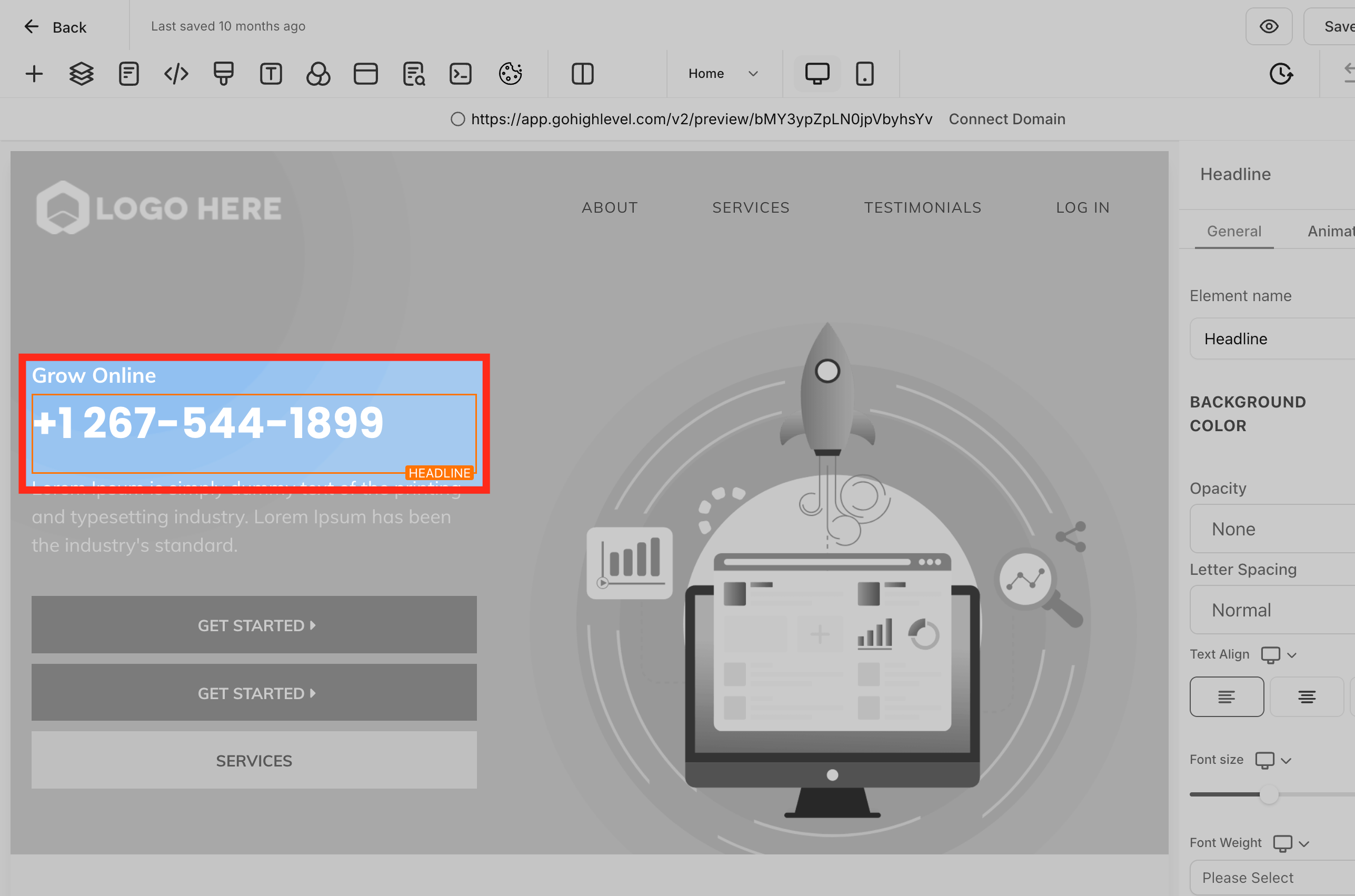
Now you can paste the swapping number on the website.
**Integrate the Tracking Snippet on Your Website (image 38 of 45)**
This screenshot appears in the "Integrate the Tracking Snippet on Your Website" section of "How to Set Up Call Tracking (Number Pool)". For context, this section explains: Call Tracking How to Set Up Call Tracking (Number Pool) Show a unique phone number to leads based on where they came from, so every call can be attributed back to its campaign or landing page. What You'll Learn Number pools are a great way to track the calls driven by paid campaigns. Using number…. This part of the guide covers 3 fields, listed below.
- Fields: The swapping number, The visible phone number on the webpage, The href="tel:..." value
- Controls: gclid, Phone Numbers, "Add Number Pool.", "Visitors Activity", Next: Create Pool, All visitors, Number Name, Pool Size, Forwarding Number, Swapping Number, Next: Choose Numbers, Local Number
Full procedure:
1. The swapping number
2. The visible phone number on the webpage
3. The href="tel:..." value
Step 5
Confirm Attribution in Call Reporting
Once the number pool is set up and running, you can view the **Keyword** column under **Reporting → Call Report**.
Your website visitors search the keywords, then land on your website and call the tracking number — we're able to attribute the source and keyword in the call reporting tab.
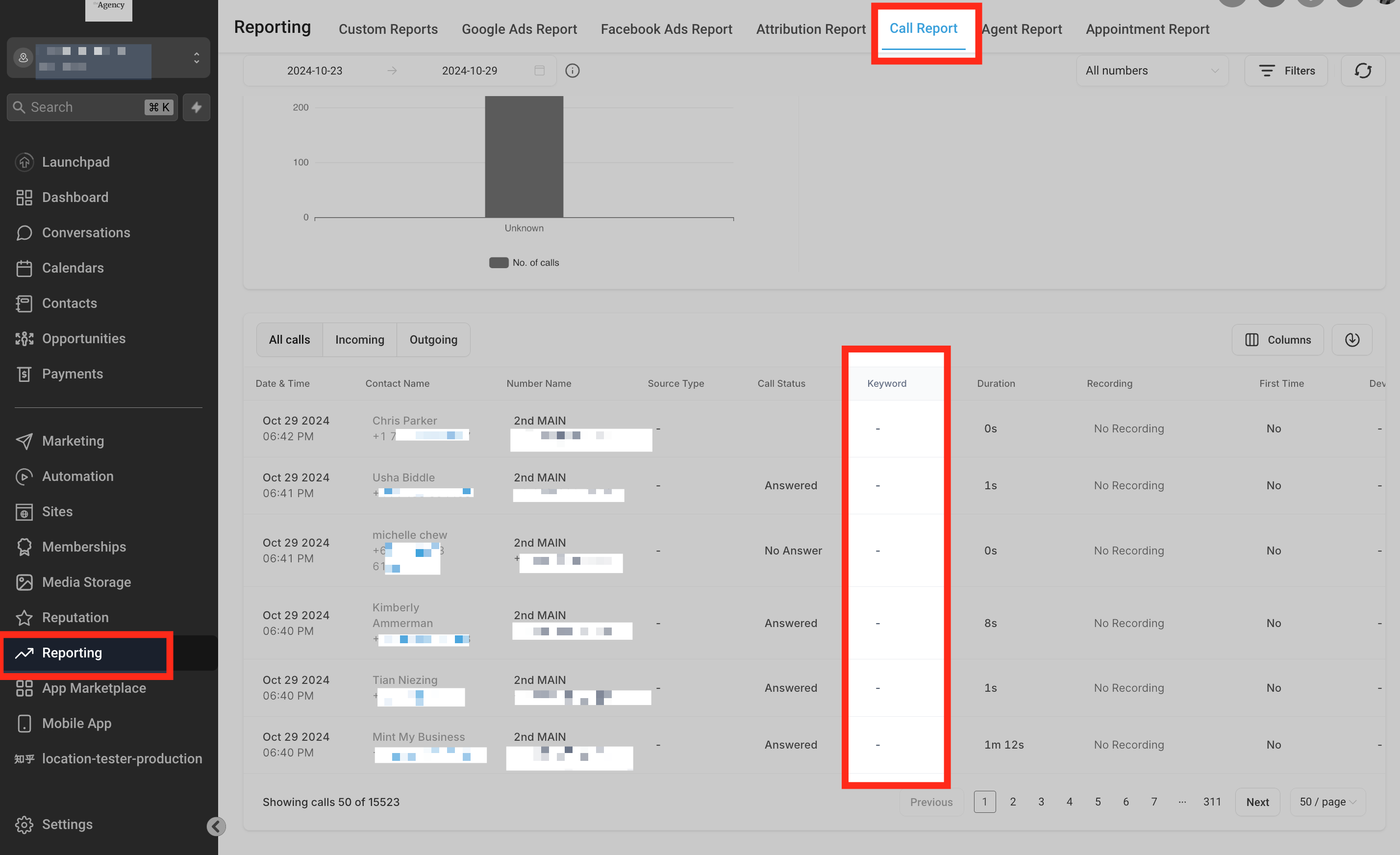
**Integrate the Tracking Snippet on Your Website (image 39 of 45)**
This screenshot appears in the "Integrate the Tracking Snippet on Your Website" section of "How to Set Up Call Tracking (Number Pool)". For context, this section explains: Call Tracking How to Set Up Call Tracking (Number Pool) Show a unique phone number to leads based on where they came from, so every call can be attributed back to its campaign or landing page. What You'll Learn Number pools are a great way to track the calls driven by paid campaigns. Using number…. This part of the guide covers 3 fields, listed below.
- Fields: The swapping number, The visible phone number on the webpage, The href="tel:..." value
- Controls: gclid, Phone Numbers, "Add Number Pool.", "Visitors Activity", Next: Create Pool, All visitors, Number Name, Pool Size, Forwarding Number, Swapping Number, Next: Choose Numbers, Local Number
Full procedure:
1. The swapping number
2. The visible phone number on the webpage
3. The href="tel:..." value
After you scroll to the right and click the arrow-down button, you can also look at the link the contact was visiting. You can also click the contact's name to view their activities:

**Integrate the Tracking Snippet on Your Website (image 40 of 45)**
This animation appears in the "Integrate the Tracking Snippet on Your Website" section of "How to Set Up Call Tracking (Number Pool)". For context, this section explains: Call Tracking How to Set Up Call Tracking (Number Pool) Show a unique phone number to leads based on where they came from, so every call can be attributed back to its campaign or landing page. What You'll Learn Number pools are a great way to track the calls driven by paid campaigns. Using number…. This part of the guide covers 3 fields, listed below.
- Fields: The swapping number, The visible phone number on the webpage, The href="tel:..." value
- Controls: gclid, Phone Numbers, "Add Number Pool.", "Visitors Activity", Next: Create Pool, All visitors, Number Name, Pool Size, Forwarding Number, Swapping Number, Next: Choose Numbers, Local Number
Full procedure:
1. The swapping number
2. The visible phone number on the webpage
3. The href="tel:..." value
## 3How To Test Number Swapping
Once you've added the tracking script to the Body of your webpage, you can test that the number swap is working by opening an incognito browser.
You would enter the following into your incognito browser — `yourwebsite.com/landing-page` — then hit enter.
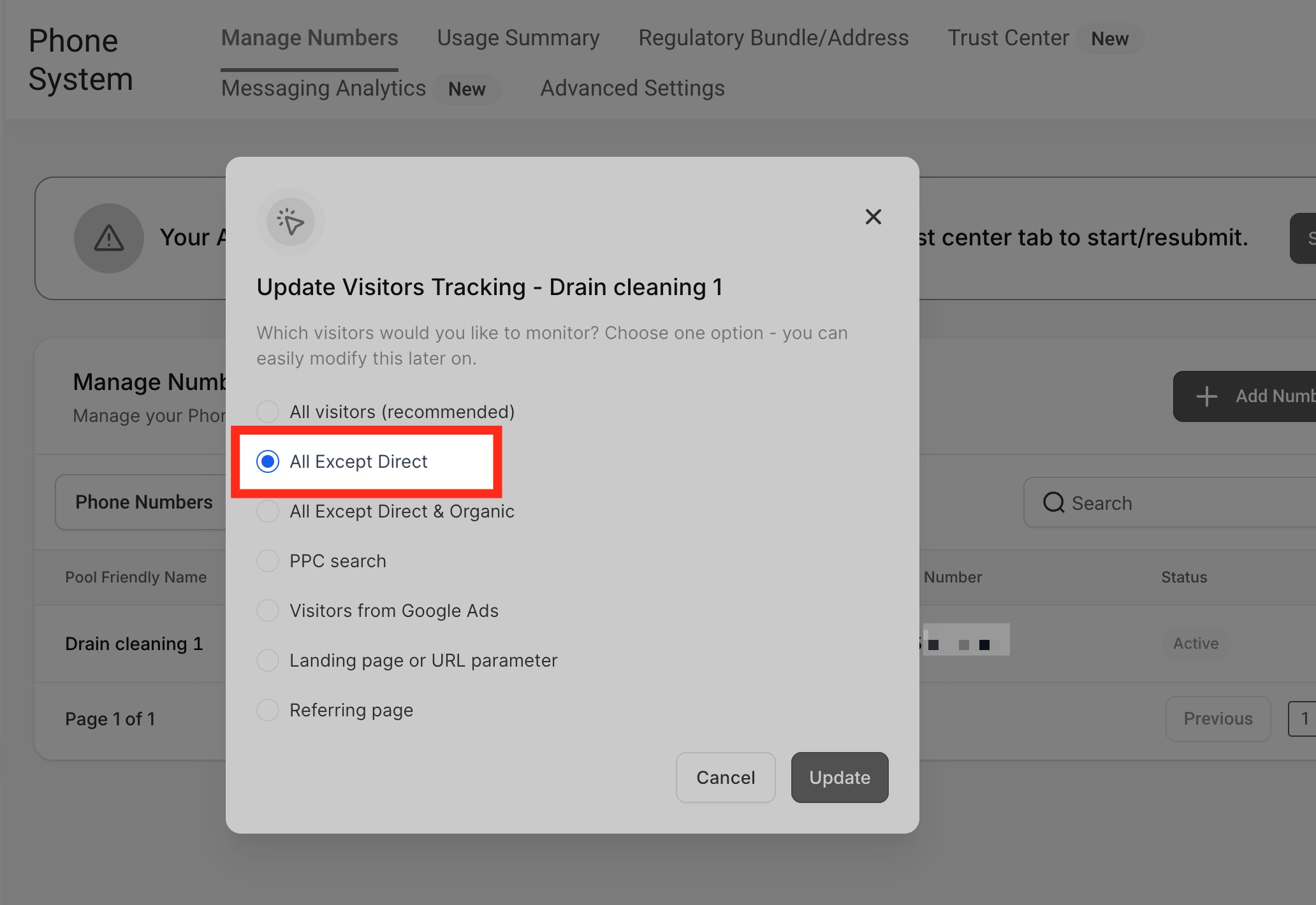
**How To Test Number Swapping (image 41 of 45)**
This screenshot appears in the "How To Test Number Swapping" section of "How to Set Up Call Tracking (Number Pool)". For context, this section explains: Call Tracking How to Set Up Call Tracking (Number Pool) Show a unique phone number to leads based on where they came from, so every call can be attributed back to its campaign or landing page. What You'll Learn Number pools are a great way to track the calls driven by paid campaigns. Using number…. This part of the guide covers 3 fields, listed below.
- Fields: The swapping number, The visible phone number on the webpage, The href="tel:..." value
- Controls: gclid, Phone Numbers, "Add Number Pool.", "Visitors Activity", Next: Create Pool, All visitors, Number Name, Pool Size, Forwarding Number, Swapping Number, Next: Choose Numbers, Local Number
Full procedure:
1. The swapping number
2. The visible phone number on the webpage
3. The href="tel:..." value
If the Tracking Option **All Except Direct** is selected, you must link the landing page URL from another webpage instead of entering the link directly from the browser to test.

**How To Test Number Swapping (image 42 of 45)**
This screenshot appears in the "How To Test Number Swapping" section of "How to Set Up Call Tracking (Number Pool)". For context, this section explains: Call Tracking How to Set Up Call Tracking (Number Pool) Show a unique phone number to leads based on where they came from, so every call can be attributed back to its campaign or landing page. What You'll Learn Number pools are a great way to track the calls driven by paid campaigns. Using number…. This part of the guide covers 3 fields, listed below.
- Fields: The swapping number, The visible phone number on the webpage, The href="tel:..." value
- Controls: gclid, Phone Numbers, "Add Number Pool.", "Visitors Activity", Next: Create Pool, All visitors, Number Name, Pool Size, Forwarding Number, Swapping Number, Next: Choose Numbers, Local Number
Full procedure:
1. The swapping number
2. The visible phone number on the webpage
3. The href="tel:..." value
E.g. link "Apple Smiles" with `yourwebsite.com/landing-page`.
## 4How To Set Up Keyword Tracking
For the platform to display the keyword that was searched before the call was initiated, you'll need to add the following parameter to the ad URL in Google Ads: `?keyword={keyword}`
So if you have a Google Ad with a URL like `yourwebsite.com/landingpage`, you would update that URL to be: `yourwebsite.com/landingpage/?keyword={keyword}`
_Related: New Feature Released — [Call Tracking!!](https://www.loom.com/share/54dd0248ee4e46698330b6740721733a)_
## 5To Swap Numbers in a Button
You can use an anchor tag and set `href` with the phone number and text as you want.
`e.g. Call Us`
Important:
The phone number inside `href="tel:..."` should use the same format as the visible/swapping number. Number Pool matching does not automatically normalize local and international formats. For international numbers, use either local or E.164 formatting consistently throughout the page.
## 6Group ID
It will help to swap only one number, but not each and every number, from different number pools — it finds the best matching number pool and swaps the number.
Use-Case Example
If the user is running two ads: if leads land on the first ad, the website will show one number; if they land on the second ad, the website will show a different number. You'll need to change the source according to the ad and set the group using a **Group ID**.
Edit the number pool → click **Add/Edit Group Id** → name the group Id → click **Update**.

**Group ID (image 43 of 45)**
This animation appears in the "Group ID" section of "How to Set Up Call Tracking (Number Pool)". For context, this section explains: Call Tracking How to Set Up Call Tracking (Number Pool) Show a unique phone number to leads based on where they came from, so every call can be attributed back to its campaign or landing page. What You'll Learn Number pools are a great way to track the calls driven by paid campaigns. Using number…. This part of the guide covers 3 fields, listed below.
- Fields: The swapping number, The visible phone number on the webpage, The href="tel:..." value
- Controls: gclid, Phone Numbers, "Add Number Pool.", "Visitors Activity", Next: Create Pool, All visitors, Number Name, Pool Size, Forwarding Number, Swapping Number, Next: Choose Numbers, Local Number
Full procedure:
1. The swapping number
2. The visible phone number on the webpage
3. The href="tel:..." value
You can click the information icon to copy the Group snippet to integrate it into the footer of your website:

**Group ID (image 44 of 45)**
This animation appears in the "Group ID" section of "How to Set Up Call Tracking (Number Pool)". For context, this section explains: Call Tracking How to Set Up Call Tracking (Number Pool) Show a unique phone number to leads based on where they came from, so every call can be attributed back to its campaign or landing page. What You'll Learn Number pools are a great way to track the calls driven by paid campaigns. Using number…. This part of the guide covers 3 fields, listed below.
- Fields: The swapping number, The visible phone number on the webpage, The href="tel:..." value
- Controls: gclid, Phone Numbers, "Add Number Pool.", "Visitors Activity", Next: Create Pool, All visitors, Number Name, Pool Size, Forwarding Number, Swapping Number, Next: Choose Numbers, Local Number
Full procedure:
1. The swapping number
2. The visible phone number on the webpage
3. The href="tel:..." value
## 7Frequently Asked Questions
Q: Why must we set up number pools to track calls?
We recommend setting up call tracking for all sources. We can determine how they arrive at your website by switching the phone number as soon as leads land from different sources. For example, for real live Google ads, there are `&gclid` parameters at the end of the landing URL that's how our snippet code sees them and switches the number accordingly, so once they call that tracking number, we match up with the website cookies, link them, and attribute the source to the leads.
Once the website visitors call the tracking number, we can attribute keywords in the Call Reporting tab, and that column will be filled out with the data:

**Frequently Asked Questions (image 45 of 45)**
This screenshot appears in the "Frequently Asked Questions" section of "How to Set Up Call Tracking (Number Pool)". For context, this section explains: Call Tracking How to Set Up Call Tracking (Number Pool) Show a unique phone number to leads based on where they came from, so every call can be attributed back to its campaign or landing page. What You'll Learn Number pools are a great way to track the calls driven by paid campaigns. Using number…. This part of the guide covers 3 fields, listed below.
- Fields: The swapping number, The visible phone number on the webpage, The href="tel:..." value
- Controls: gclid, Phone Numbers, "Add Number Pool.", "Visitors Activity", Next: Create Pool, All visitors, Number Name, Pool Size, Forwarding Number, Swapping Number, Next: Choose Numbers, Local Number
Full procedure:
1. The swapping number
2. The visible phone number on the webpage
3. The href="tel:..." value
Q: What is the cost/price for setting up a Number Pool?
Each number in a Number Pool is billed at the same rate as a standard phone number in your account. A minimum of 4 numbers is required per pool, which means you will incur charges for each of those numbers.
If you're using LC-Twilio, standard Twilio pricing applies (e.g., $1/month per U.S. number plus usage). If your agency is on your own Twilio, pricing will depend on your Twilio account settings. Keep in mind that larger pools will cost more, so choose the pool size based on your traffic volume.
You can always view or adjust phone number costs under **Subaccount → Settings → Phone Numbers**.
Q: Can I direct calls from the Number Pool to the web app or the mobile app?
Currently, this is not possible. Calls made to Number Pool can only go to the 'Forward Calls to' number.
Q: Do the displayed phone number and the clickable tel: link need to use the same format?
Yes. Number Pool swapping uses the phone number in the exact format configured on the page. If the displayed phone number and the value inside the `tel:` link use different formats, the displayed number may swap while the clickable link does not.
For example — displayed number: **(02) 6193 4089**
Recommended clickable link: `Call Us`
Using `Call Us` while the displayed number is (02) 6193 4089 may prevent the hyperlink from swapping, because the two values use different formats.
Q: Are local and international/E.164 versions of the same phone number treated as the same number?
No. Number Pool swapping does not automatically normalize local and international formats as equivalent. For example, (02) 6193 4089 and +61261934089 are treated as different values for matching purposes.
To ensure both the displayed number and clickable link swap correctly, use the same format consistently across:
- The swapping number
- The visible phone number on the webpage
- The `href="tel:..."` value
Q: Can I use international or E.164 phone number formatting with Number Pools?
Yes, international/E.164 formatting can be used, but the format must be used consistently. For example, if the swapping number is configured as **+61261934089**, then the webpage should also use:
Displayed number: **+61261934089**
Clickable link: `Call Us`
Do not mix local and international formats for the same number if you expect both the displayed number and hyperlink to swap.
---
Documentation for GHL Customer Care. Support: support@ghlcustomercare.com